Dados da Steam coletados em 14/11/2026 20:12 · 1 amostras de jogadores no banco. Projeto independente, sem ligação com a Valve.
Jogadores
Quando o jogo tem mais gente
O mapa de calor aparece quando houver pelo menos 24 horas de dados de jogadores deste jogo.
Mídia





Usuários da Steam
- Tempo para zerar (HowLongToBeat)média de horas até terminar a história e até 100%
- Suporte
- E-mail de suportesupport@gameragame.com
- Redes sociaisX (Twitter) · Discord · TikTok · Weibo · Bilibili
Não tem português do Brasil.
| Idioma | Interface | Legendas | Áudio |
|---|---|---|---|
| Inglês | ✓ | ✓ | ✓ |
| Alemão | ✓ | ✓ | ✓ |
| Chinês simplificado | ✓ | ✓ | ✓ |
| Francês | ✓ | ✓ | ✓ |
| Japonês | ✓ | ✓ | ✓ |
Mínimos
- Requer um sistema operativo e processador de 64 bits
- Sistema Operativo *
- Windows 7(64-Bit)
- Processador
- i3-530 2.93GHZ 2 Core
- Memória
- 8 GB de RAM
- Placa gráfica
- Dedicated graphics card, GTX 750 Ti 2GB
- DirectX
- Versão 11
- Espaço no disco
- Requer 5 GB de espaço livre
- Placa de som
- DirectX compatible
- Notas adicionais
- GPU must support Shader Model 5.0
Recomendados
- Requer um sistema operativo e processador de 64 bits
- Sistema Operativo
- Windows 10(64-Bit)
- Processador
- i9 11900KF8 Core
- Memória
- 32 GB de RAM
- Placa gráfica
- Dedicated graphics card, GTX 2070
- DirectX
- Versão 11
- Espaço no disco
- Requer 20 GB de espaço livre
- Placa de som
- DirectX compatible
- Notas adicionais
- GPU must support Shader Model 5.0. Display Resolution 1080p +
Preço em cada país
 Ucrânia · 30% abaixo do Brasil
| País | Preço atual | Preço cheio | Desconto | Em reais | vs Brasil | Menor visto |
|---|---|---|---|---|---|---|
| Ucrânia | ₴ 279 | ₴ 279 | — | -30% | ₴ 279 | |
 Filipinas | ₱ 449,95 | ₱ 449,95 | — | -19% | ₱ 449,95 | |
 Indonésia | Rp 129.029 | Rp 129.029 | — | -19% | Rp 129.029 | |
 Índia | ₹ 679 | ₹ 679 | — | -18% | ₹ 679 | |
 África do Sul | R 130,00 | R 130,00 | — | -12% | R 130,00 | |
 Chile | CLP$ 7.700 | CLP$ 7.700 | — | -11% | CLP$ 7.700 | |
 Rússia | ₽ 686 | ₽ 686 | — | -5% | ₽ 686 | |
 Vietnã | ₫ 215.000 | ₫ 215.000 | — | -4% | ₫ 215.000 | |
 Tailândia | ฿ 289,00 | ฿ 289,00 | — | -2% | ฿ 289,00 | |
 Brasil | R$ 49,37 | R$ 49,37 | — | — | R$ 49,37 | |
 Cazaquistão | ₸ 3.897 | ₸ 3.897 | — | 0% | ₸ 3.897 | |
 Paquistão · Sul da Ásia (dólar) | US$ 9,19 | US$ 9,19 | — | +5% | US$ 9,19 | |
 Arábia Saudita | SR 34,95 | SR 34,95 | — | +7% | SR 34,95 | |
 Malásia | RM 39,00 | RM 39,00 | — | +9% | RM 39,00 | |
 Colômbia | COL$ 31.707 | COL$ 31.707 | — | +10% | COL$ 31.707 | |
 Taiwan | NT$ 318 | NT$ 318 | — | +11% | NT$ 318 | |
 México | Mex$ 185,99 | Mex$ 185,99 | — | +15% | Mex$ 185,99 | |
 China | CN¥ 70,00 | CN¥ 70,00 | — | +20% | CN¥ 70,00 | |
 Armênia · ex-URSS (dólar) | US$ 10,49 | US$ 10,49 | — | +20% | US$ 10,49 | |
 Uruguai | $U 429 | $U 429 | — | +21% | $U 429 | |
 Kuwait | KD 3,35 | KD 3,35 | — | +23% | KD 3,35 | |
 Peru | S/ 37,00 | S/ 37,00 | — | +24% | S/ 37,00 | |
 Hong Kong | HK$ 89,00 | HK$ 89,00 | — | +30% | HK$ 89,00 | |
 Catar | QR 41,99 | QR 41,99 | — | +32% | QR 41,99 | |
 Japão | ¥ 2.050 | ¥ 2.050 | — | +47% | ¥ 2.050 | |
 Nova Zelândia | NZ$ 24,79 | NZ$ 24,79 | — | +57% | NZ$ 24,79 | |
 Singapura | S$ 18,50 | S$ 18,50 | — | +64% | S$ 18,50 | |
 Emirados Árabes | AED 53,00 | AED 53,00 | — | +65% | AED 53,00 | |
 Noruega | kr 145,00 | kr 145,00 | — | +73% | kr 145,00 | |
 Coreia do Sul | ₩ 20.500 | ₩ 20.500 | — | +76% | ₩ 20.500 | |
 Canadá | CDN$ 22,79 | CDN$ 22,79 | — | +83% | CDN$ 22,79 | |
 Polônia | zł 71,99 | zł 71,99 | — | +106% | zł 71,99 | |
 Zona do euro | € 16,79 | € 16,79 | — | +112% | € 16,79 | |
 Costa Rica | ₡ 8.500 | ₡ 8.500 | — | +115% | ₡ 8.500 | |
 Austrália | A$ 28,95 | A$ 28,95 | — | +125% | A$ 28,95 | |
 Estados Unidos | US$ 19,99 | US$ 19,99 | — | +129% | US$ 19,99 | |
 Argentina · América Latina (dólar) | US$ 19,99 | US$ 19,99 | — | +129% | US$ 19,99 | |
 Turquia · Oriente Médio e N. África (dólar) | US$ 19,99 | US$ 19,99 | — | +129% | US$ 19,99 | |
 Reino Unido | £ 15,49 | £ 15,49 | — | +134% | £ 15,49 | |
 Israel | ₪ 73,95 | ₪ 73,95 | — | +164% | ₪ 73,95 | |
 Suíça | CHF 19,50 | CHF 19,50 | — | +166% | CHF 19,50 |
Do mais barato ao mais caro em reais, pela cotação do dia (só para comparar: o preço cobrado é o da moeda local).
Histórico de preço
Ainda não há promoções registradas para este jogo aqui. Nas grandes promoções da Steam (verão, inverno, outono e primavera) a maioria dos jogos entra com desconto. As faixas douradas no gráfico marcam as grandes promoções da Steam.
Todas as mudanças de preço
| Visto em | País | Preço | Preço cheio | Desconto | Em reais |
|---|---|---|---|---|---|
| 14/11/2026 20:12 | Brasil | R$ 49,37 | R$ 49,37 | — | R$ 49,37 |
| 14/11/2026 20:12 | Estados Unidos | US$ 19,99 | US$ 19,99 | — | ≈ R$ 112,90 |
| 14/11/2026 20:12 | Argentina · América Latina (dólar) | US$ 19,99 | US$ 19,99 | — | ≈ R$ 112,90 |
| 14/11/2026 20:12 | México | Mex$ 185,99 | Mex$ 185,99 | — | ≈ R$ 56,62 |
| 14/11/2026 20:12 | Chile | CLP$ 7.700 | CLP$ 7.700 | — | ≈ R$ 43,83 |
| 14/11/2026 20:12 | Reino Unido | £ 15,49 | £ 15,49 | — | ≈ R$ 115,67 |
| 14/11/2026 20:12 | Zona do euro | € 16,79 | € 16,79 | — | ≈ R$ 104,67 |
| 14/11/2026 20:12 | Turquia · Oriente Médio e N. África (dólar) | US$ 19,99 | US$ 19,99 | — | ≈ R$ 112,90 |
| 14/11/2026 20:12 | Japão | ¥ 2.050 | ¥ 2.050 | — | ≈ R$ 72,47 |
| 14/11/2026 20:12 | Índia | ₹ 679 | ₹ 679 | — | ≈ R$ 40,68 |
| 14/11/2026 20:12 | Canadá | CDN$ 22,79 | CDN$ 22,79 | — | ≈ R$ 90,27 |
| 14/11/2026 20:12 | Austrália | A$ 28,95 | A$ 28,95 | — | ≈ R$ 110,88 |
| 14/11/2026 20:12 | Nova Zelândia | NZ$ 24,79 | NZ$ 24,79 | — | ≈ R$ 77,41 |
| 14/11/2026 20:12 | Suíça | CHF 19,50 | CHF 19,50 | — | ≈ R$ 131,37 |
| 14/11/2026 20:12 | Noruega | kr 145,00 | kr 145,00 | — | ≈ R$ 85,59 |
| 14/11/2026 20:12 | Polônia | zł 71,99 | zł 71,99 | — | ≈ R$ 101,85 |
| 14/11/2026 20:12 | Ucrânia | ₴ 279Mais barato em reais | ₴ 279 | — | ≈ R$ 34,68 |
| 14/11/2026 20:12 | Rússia | ₽ 686 | ₽ 686 | — | ≈ R$ 47,01 |
| 14/11/2026 20:12 | Cazaquistão | ₸ 3.897 | ₸ 3.897 | — | ≈ R$ 49,45 |
| 14/11/2026 20:12 | Armênia · ex-URSS (dólar) | US$ 10,49 | US$ 10,49 | — | ≈ R$ 59,25 |
| 14/11/2026 20:12 | Paquistão · Sul da Ásia (dólar) | US$ 9,19 | US$ 9,19 | — | ≈ R$ 51,91 |
| 14/11/2026 20:12 | China | CN¥ 70,00 | CN¥ 70,00 | — | ≈ R$ 59,10 |
| 14/11/2026 20:12 | Hong Kong | HK$ 89,00 | HK$ 89,00 | — | ≈ R$ 64,07 |
| 14/11/2026 20:12 | Taiwan | NT$ 318 | NT$ 318 | — | ≈ R$ 54,57 |
| 14/11/2026 20:12 | Coreia do Sul | ₩ 20.500 | ₩ 20.500 | — | ≈ R$ 86,66 |
| 14/11/2026 20:12 | Indonésia | Rp 129.029 | Rp 129.029 | — | ≈ R$ 39,98 |
| 14/11/2026 20:12 | Malásia | RM 39,00 | RM 39,00 | — | ≈ R$ 53,91 |
| 14/11/2026 20:12 | Filipinas | ₱ 449,95 | ₱ 449,95 | — | ≈ R$ 39,81 |
| 14/11/2026 20:12 | Singapura | S$ 18,50 | S$ 18,50 | — | ≈ R$ 81,16 |
| 14/11/2026 20:12 | Tailândia | ฿ 289,00 | ฿ 289,00 | — | ≈ R$ 48,18 |
| 14/11/2026 20:12 | Vietnã | ₫ 215.000 | ₫ 215.000 | — | ≈ R$ 47,20 |
| 14/11/2026 20:12 | Colômbia | COL$ 31.707 | COL$ 31.707 | — | ≈ R$ 54,51 |
| 14/11/2026 20:12 | Peru | S/ 37,00 | S/ 37,00 | — | ≈ R$ 61,35 |
| 14/11/2026 20:12 | Uruguai | $U 429 | $U 429 | — | ≈ R$ 59,54 |
| 14/11/2026 20:12 | Costa Rica | ₡ 8.500 | ₡ 8.500 | — | ≈ R$ 106,04 |
| 14/11/2026 20:12 | África do Sul | R 130,00 | R 130,00 | — | ≈ R$ 43,40 |
| 14/11/2026 20:12 | Emirados Árabes | AED 53,00 | AED 53,00 | — | ≈ R$ 81,51 |
| 14/11/2026 20:12 | Arábia Saudita | SR 34,95 | SR 34,95 | — | ≈ R$ 52,64 |
| 14/11/2026 20:12 | Catar | QR 41,99 | QR 41,99 | — | ≈ R$ 65,15 |
| 14/11/2026 20:12 | Kuwait | KD 3,35 | KD 3,35 | — | ≈ R$ 60,81 |
| 14/11/2026 20:12 | Israel | ₪ 73,95 | ₪ 73,95 | — | ≈ R$ 130,17 |
Uma linha nova aparece sempre que o preço muda. A linha em destaque é o preço atual de cada país. Valores em reais pela cotação do dia (14/11), só para comparar: o preço cobrado é o da moeda local. Rates By Exchange Rate API
Edições e pacotes
| Opção de compra | Preço no Brasil | Economia do pacote |
|---|---|---|
| Cosmic ConstructorsPacote | -80% | R$ 110,70vs. R$ 134,99 separado |
| Dyson Sphere ProgramJogo | R$ 49,37 | — |
| Automation Pipeline MasterPacote · 2 itens | R$ 116,41 | R$ 12,94vs. R$ 129,35 separado |
| Dyson Sphere Program X The RiftbreakerPacote · 2 itens | R$ 124,52 | R$ 13,84vs. R$ 138,36 separado |
| Chongqing Local Spicy Games BundlePacote · 2 itens | R$ 168,65 | R$ 18,74vs. R$ 187,39 separado |
Da mais barata para a mais cara. "Economia do pacote" compara com comprar cada item separado, pelo preço de hoje.
DLCs · preços no Brasil
 Dyson Sphere Program - SoundtrackApp ID 1523190 · 21 jan. 2021R$ 10,89
 Dyson Sphere Program - Digital Art BookApp ID 1530310 · 20 abr. 2021R$ 20,69
Cartas colecionáveis · cartas, laminadas e insígnias
Este jogo não tem cartas colecionáveis Steam.
Itens de perfil · fundos, emoticons e loja de pontos
Este jogo não tem itens de perfil nem itens na loja de pontos (conferido em 14/11/2026 20:12).
Conquistas · percentual global de jogadores
As 5 mais raras
 Shoot Oneself in the Foot0,3%Lure Lancers to destroy a Planetary Base.
 Won't Lie Low0,4%Attract an attack from a space unit within 1 hour at Difficulty 1.0 or above.
 Unbowed, Unbent, Unbroken0,4%Keep Icarus' energy shield's power consumption at 1GW while resisting damage for over 1 minute.
 Strangle in the cradle0,7%Wipe out a Dark Fog Planetary Base within 1 hour at Difficulty 1.0 or above.
 In the Spotlight0,8%Have 40 Laser Towers shoot the same target at Difficulty 1.0 or above.
Todas
 Know any campfire songs? Consume at least 40 wood by burning it.61,9%ACHIEVEMENT_1
 Don't underestimate Plant FuelConsume at least 100 Plant Fuel by burning it.60,6%ACHIEVEMENT_2
 Infinite Factory IExceed a total energy consumption of 1GJ.60,4%ACHIEVEMENT_98
 Small factoryReach a total power generation of 20MW.42,0%ACHIEVEMENT_93
 Infinite Factory IIExceed a total energy consumption of 1TJ.32,4%ACHIEVEMENT_99
 Mineral field depletedDeplete 1 Vein.31,0%ACHIEVEMENT_17
 Medium factoryReach a total power generation of 100MW.30,2%ACHIEVEMENT_94
 Low batteryHave Icarus’ energy below 5% for more than 3 minutes when on the ground.28,5%ACHIEVEMENT_29
 Blackbox designerCopy and save a Blueprint.28,3%ACHIEVEMENT_9
 Tickets please!Establish an Interstellar Logistics Transportation line.26,4%ACHIEVEMENT_27
 High-riseBuild a building at least 7 stories tall.26,3%ACHIEVEMENT_23
 Nice Surprise 1Obtain at least 100 Titanium Ore by collecting Stone.24,4%ACHIEVEMENT_3
 Like a diamond in the skyLight a star that belongs to you in the Milky Way View.23,0%ACHIEVEMENT_87
 The sun rises in the...West?Find and land on a planet rotating on a reverse axis.22,8%ACHIEVEMENT_47
 Light-footedUnlock upgrade to make mecha reach 12m/s movement speed.21,9%ACHIEVEMENT_13
 Slip 'n' slideFill 10 tanks of fluid in a game.21,2%ACHIEVEMENT_19
 I'm gonna need more drones!Control 10 or more Construction Drones.19,9%ACHIEVEMENT_10
 I'm not tiltedFind and land on a planet rotating on a horizontal axis.19,7%ACHIEVEMENT_46
 Now BoardingHave at least 100 Logistics Drones for a planet in transit.19,5%ACHIEVEMENT_20
 Only impossible until it's notStart warp engine.19,5%ACHIEVEMENT_41
 Sail away with meUnlock upgrade to make the Solar Sail last 2 hours.18,9%ACHIEVEMENT_11
 Planet Explorer ILand on 5 different planets!18,9%ACHIEVEMENT_43
 CentreBrain needs more energy ITotal power generation of the Dyson Sphere reaches 200MW.18,8%ACHIEVEMENT_88
 Space invadersUse the mineral burial function to bury at least 20 Veins.18,6%ACHIEVEMENT_16
 Large factoryReach a total power generation of 1GW.17,8%ACHIEVEMENT_95
 Employee of the monthUnlock upgrade to allow Pile Sorters to load and unload cargos simultaneously.17,4%ACHIEVEMENT_14
 Intergalactic logisticsEstablish 5 Interstellar Logistics Transportation lines between different planetary systems.16,3%ACHIEVEMENT_28
 Build it and they will comeBuild 10 Orbital Collectors.16,3%ACHIEVEMENT_55
 CentreBrain needs more energy IITotal power generation of the Dyson Sphere reaches 1GW.15,4%ACHIEVEMENT_89
 BullseyeLaunch a total of 100K Solar Sails.15,3%ACHIEVEMENT_68
 Who approved this?Unlock technology to make the construction latitude of the Dyson Sphere node reach 45 degrees.14,9%ACHIEVEMENT_12
 Super Nova!Activate Supernova.14,6%ACHIEVEMENT_119
 Interstellar convoyHave at least 50 Interstellar Logistics Vessels in space.13,9%ACHIEVEMENT_21
 Where no coal has gone beforeUse coal as the only fuel to move from one planet to another.13,5%ACHIEVEMENT_40
 No coal? No problem!Generate more than 60MW of electricity on a planet using Wind Turbines.12,9%ACHIEVEMENT_83
 What time is it?Find and land on a planet with day and night tidal locking.12,5%ACHIEVEMENT_45
 SunbatherGenerate more than 180MW of electricity on a planet using Solar Panels.12,4%ACHIEVEMENT_84
 Backup planBuild a Star Cluster with an energy storage capacity of 27GJ or more.12,4%ACHIEVEMENT_92
 Nice Surprise 3Obtain at least 100 Organic Crystals by collecting plants.12,1%ACHIEVEMENT_5
 My planet, my rules!Name a planet.11,2%ACHIEVEMENT_38
 Right Under My NoseLand on a planet that is 8000m or closer to a Dark Fog Hive.11,1%ACHIEVEMENT_122
 Critical thinkerProduce a total of 60,000 Critical Photons.11,0%ACHIEVEMENT_70
 Mission accomplishedComplete the game.10,9%ACHIEVEMENT_61
 Dust to dust ICollect 1M soil piles from Dark Fog.10,6%ACHIEVEMENT_101
 Giant factoryReach a total power generation of 5GW.10,4%ACHIEVEMENT_96
 Green powerProduce at least 43,200 Electromagnetic turbines per hour.10,3%ACHIEVEMENT_74
 Planet Explorer IILand on 15 different planets!10,0%ACHIEVEMENT_44
 We have lift-offLaunch a total of 30,000 Small Carrier Rockets.10,0%ACHIEVEMENT_69
 Going nuclearGenerate more than 600MW of power on a planet using Mini Fusion Power Plants.9,1%ACHIEVEMENT_86
 Don't sand so close to meCollect at least 4M units of sand in a game.8,4%ACHIEVEMENT_25
 Happy Hunting INeutralize 100 Dark Fog space units.8,3%ACHIEVEMENT_104
 Got Deuterium?Use Fractionators to produce at least 100K Deuterium per hour on a single planet.8,1%ACHIEVEMENT_73
 No diving!Have a mecha run out of energy and fall into water.7,2%ACHIEVEMENT_32
 Nice Surprise 2Obtain at least 100 Silicon Ore by collecting Stone.7,2%ACHIEVEMENT_4
 Maximum efficiencyBuild and maintain 100 Ray Receivers with a receiving efficiency of over 85%.7,0%ACHIEVEMENT_56
 Universe matrix, Yellow BeltProduce at least 21,600 Universe matrices per hour.6,9%ACHIEVEMENT_80
 Infinite Factory IIIExceed a total energy consumption of 1PJ.6,8%ACHIEVEMENT_100
 GotchaFind Dark Fog Communicator.6,6%ACHIEVEMENT_126
 Are you proud of me, Stephen?Find and orbit a Black Hole.6,3%ACHIEVEMENT_48
 Forgot about thatBuild Wind Turbines on a planet with no atmosphere.6,0%ACHIEVEMENT_22
 All systems are go!Achieve discharge power of more than 300MW on a planet using Energy Hubs.6,0%ACHIEVEMENT_85
 Space junkExhaust both fuel and energy while flying in space.5,9%ACHIEVEMENT_30
 Electromagnetic matrixProduce at least 43,200 Electromagnetic matrices per hour.5,8%ACHIEVEMENT_75
 Dust to dust IICollect 10M soil piles from Dark Fog.5,6%ACHIEVEMENT_102
 Sonic boom!Exceed a sailing speed of 340m/s in the atmosphere.5,5%ACHIEVEMENT_36
 Energy matrixProduce at least 43,200 Energy matrices per hour.5,5%ACHIEVEMENT_76
 Happy Hunting IINeutralize 1000 Dark Fog space units.5,4%ACHIEVEMENT_105
 Structure matrixProduce at least 43,200 Structure matrices per hour.5,4%ACHIEVEMENT_77
 Power surgeUse 12 Wireless Power Towers to charge a mecha at the same time.5,3%ACHIEVEMENT_33
 Secrets of the universe IUpload a total of 1M Universe matrices.5,3%ACHIEVEMENT_71
 Gravity matrixProduce at least 43,200 Gravity matrices per hour.5,3%ACHIEVEMENT_79
 Universe matrix, Green BeltProduce at least 43,200 Universe matrices per hour.5,3%ACHIEVEMENT_81
 Information matrixProduce at least 43,200 Information matrices per hour.5,2%ACHIEVEMENT_78
 Boy geniusFind and orbit a Neutron Star.5,0%ACHIEVEMENT_49
 Burn baby burnHave Icarus burn at least 16 different fuels in a game.4,9%ACHIEVEMENT_34
 You Shall Not Pass!Neutralize a Relay Station before it lands on a planet.4,6%ACHIEVEMENT_123
 ChemistMake 20 Organic Crystals by hand using the original formula.4,5%ACHIEVEMENT_8
 Bon voyage!Travel to the planetary system farthest from your original system.4,4%ACHIEVEMENT_50
 Nice Surprise 5Obtain at least 10 Carbon Nanotubes by collecting plants.4,1%ACHIEVEMENT_7
 Running on fumesManually collect 20 Hydrogen with Icarus on a Gas Giant while energy is at 5% or less.3,9%ACHIEVEMENT_31
 Universe factoryReach a total power generation of 50GW.3,7%ACHIEVEMENT_97
 It's on FireIcarus' Replicator speed reaches 400%.3,6%ACHIEVEMENT_127
 Universe matrix, Blue BeltProduce at least 108,000 Universe matrices per hour.3,6%ACHIEVEMENT_82
 All CalculatedUnlock all secret technologies.3,5%ACHIEVEMENT_128
 Faster than lightReach a sailing speed of 3000m/s in non-warp transportation.3,4%ACHIEVEMENT_37
 Memento!Don't dismantle the landing capsule before completing the game.3,3%ACHIEVEMENT_59
 Icarus, PhDUnlock all technologies (upgrade Unlimited Technology at least once).3,3%ACHIEVEMENT_60
 Firing on all cylindersUnlock upgrade to decrease the mineral mining consumption rate to less than 15%.3,2%ACHIEVEMENT_58
 A.T FieldPlanetary Shield's coverage reaches 100% over a planet.2,8%ACHIEVEMENT_118
 Solar Sail? No thank you!Complete the game without launching a Solar Sail.2,7%ACHIEVEMENT_65
 You Started ItHave Icarus destroyed by Dark Fog at Passive Dark Fog aggressiveness.2,6%ACHIEVEMENT_121
 One giant leap for mankind!Leave the original planet and land on another within an hour.2,6%ACHIEVEMENT_39
 Before our timeLand on another planet outside the initial planetary system before unlocking Warp drive.2,6%ACHIEVEMENT_42
 Alien Mineral Protection ActComplete the game without gathering rare veins to obtain rare ores.2,6%ACHIEVEMENT_67
 Secrets of the universe IIUpload a total of 10M Universe matrices.2,6%ACHIEVEMENT_72
 Environmental nightmareDrop 3000 units of Titanium Ingot at once while flying through space.2,5%ACHIEVEMENT_54
 Wrong PlaceLand on a planet occupied by over 20 Planetary Bases.2,4%ACHIEVEMENT_125
 Dust to dust IIICollect 100M soil piles from Dark Fog.2,3%ACHIEVEMENT_103
 I can see my house from here!Get Icarus 40m above sea level without entering flight mode.2,3%ACHIEVEMENT_35
 I saw this in a movie onceCover a planet with a Foundation.2,2%ACHIEVEMENT_26
 Global OffenseBe simultaneously assaulted by 12 Planetary Bases on a planet.2,0%ACHIEVEMENT_124
 EnvironmentalistComplete the game without using Foundations.2,0%ACHIEVEMENT_66
 Happy Hunting IIINeutralize 10000 Dark Fog space units.1,9%ACHIEVEMENT_106
 Nice Surprise 4Obtain at least 100 Sulfuric Acid by collecting plants.1,7%ACHIEVEMENT_6
 CentreBrain needs more energy IIITotal power generation of the Dyson Sphere reaches 1TW.1,7%ACHIEVEMENT_90
 Minerals by the dozenCover at least 12 Veins with one Mining machine.1,6%ACHIEVEMENT_18
 Bullet StormBullet consumption reaches 360/min on any planet.1,5%ACHIEVEMENT_107
 MagpieDiscover 7 kinds of rare minerals, and collect at least 10 by hand.1,5%ACHIEVEMENT_15
 InvincibleBase radius of Icarus' Energy Shield reaches 25m.1,3%ACHIEVEMENT_117
 DeterminationUse more than 80K foundations on a Waterworld planet.1,3%ACHIEVEMENT_24
 Well traveledTravel to at least 32 planetary systems in a game.1,3%ACHIEVEMENT_51
 Data rules everything around meAchieve a Matrix Lab upload rate of 1M hash/s.1,3%ACHIEVEMENT_57
 Let there be light!Light an Artificial Star on the North and South Pole of the original planet, an Ice Field Gelisol Planet, and the eternal night side of a tide-locked planet.1,2%ACHIEVEMENT_52
 x0.5 Resource completionComplete the game on x0.5 resource difficulty.1,2%ACHIEVEMENT_62
 Didn't break a sweat!Complete the game within 25 hours on x1 (or less) resource difficulty.1,2%ACHIEVEMENT_63
 Mission impossible!Complete the game within 10 hours on x1 (or less) resource difficulty.1,1%ACHIEVEMENT_64
 We can make it if we tryBuild a Dyson Sphere around a Red Giant star with a power generation performance of more than 10GW.1,1%ACHIEVEMENT_91
 A Penny SavedComplete the mission without any buildings destroyed at Difficulty 1.0 or above.1,0%ACHIEVEMENT_108
 Monster KillIcarus neutralizes over 1,000 Dark Fog units within 1 minute.1,0%ACHIEVEMENT_114
 Peace & LoveComplete the mission without any Dark Fog buildings neutralized at Difficulty 1.0 or above.0,9%ACHIEVEMENT_110
 War has ChangedComplete the mission without building any Turrets at Difficulty 1.0 or above.0,9%ACHIEVEMENT_112
 POPCORN!Implosion Cannon neutralizes 40 enemies or more with 1 shot.0,9%ACHIEVEMENT_115
 Lean mean cleaning machineUse Icarus' garbage clearing function to absorb 50,000 units of Iron Ingot at the same time.0,9%ACHIEVEMENT_53
- In the SpotlightHave 40 Laser Towers shoot the same target at Difficulty 1.0 or above.0,8%ACHIEVEMENT_111
- Strangle in the cradleWipe out a Dark Fog Planetary Base within 1 hour at Difficulty 1.0 or above.0,7%ACHIEVEMENT_109
- Won't Lie LowAttract an attack from a space unit within 1 hour at Difficulty 1.0 or above.0,4%ACHIEVEMENT_113
- Unbowed, Unbent, UnbrokenKeep Icarus' energy shield's power consumption at 1GW while resisting damage for over 1 minute.0,4%ACHIEVEMENT_116
- Shoot Oneself in the FootLure Lancers to destroy a Planetary Base.0,3%ACHIEVEMENT_120
Evolução da nota · análises positivas mês a mês
Linha: % de análises positivas de cada mês (cor pela nota: azul 70%+, amarelo 40–69%, vermelho abaixo). Barras: quantas análises o mês teve. Passe o mouse para ver os números. Fonte: histórico de análises da loja da Steam, atualizado em 14/11/2026 20:12.
Comentários dos jogadores · análises da Steam
- ▲ Recomenda21,8 h jogadas ao escrever28 ago. 2026Acesso antecipado
Jogo muito interessante e leva a imaginação ao limite, pena não ter a tradução para Português
3 acharam útilVer na Steam - ▲ Recomenda6,4 h jogadas ao escrever16 fev. 2026Acesso antecipado
Lindo o tempo todo, voc~e joga novamente ao longo dos anos.
Mas factorio ainda é notóriamente melhor quando você pega pra jogar.3 acharam útilVer na Steam - ▲ Recomenda99,2 h jogadas ao escrever5 mar. 2026Acesso antecipado
Se você quer Pensar, é com Logistics!
Se você não quer sorrir, é com Hydrogen!
Se você não quer sorrir e quer pensar, é com DSP!!
Minha recomendação se suas intenções e uma longa jornada:
Não jogue(Brincadeirinha!!!).
Jogue sim vai gostar ate demais e passar horas desenvolvendo uma fabrica de Hydrogen sem exportar esse recurso de um Gas Giant Planet e consequentemente aprender um pouco de inglês pela ausência de uma tradução PT-BR.
Enjoy!!! - ▲ Recomenda186,2 h jogadas ao escrever24 fev. 2026Acesso antecipado
A cada atualização é perceptível o compromisso dos desenvolvedores. Pelo preço de um lanche você tem uma das melhores experiências do gênero, se não a melhor (e o jogo nem está pronto ainda). No momento que escrevo esta análise, os devs estão trabalhando em otimização, qualidade de vida (incluindo ferramentas que vão permitir a criação de uma wiki pessoal dentro do jogo), e um sistema de criação de estações espaciais e veículos. Simplesmente insano. Vale cada centavo mesmo em acesso antecipado.
1 acharam útilVer na Steam - ▲ Recomenda50,1 h jogadas ao escrever27 dez. 2025Acesso antecipado
pra quem gosta de gerenciamento de recursos é um jogo perfeito, um jogo de gerenciamento em escala astronômica, seria fácil se sentir confuso ou perdido mas capricharam muito em qualidade de vida do jogo, não é cansativo, muito pelo contrario é altamente viciante, sempre algo pra melhorar ou fazer, além de um desafio constante na medida certa, cada arte e detalhes dos itens menores aos planetas e estrelas são lindos, ótimo jogo.
2 acharam útilVer na Steam
- ▼ Não recomenda25,9 h jogadas ao escrever5 fev. 2026Acesso antecipado
OMG, I liberated a new material: 1 hour building an assembly line for me to get that material.
I like management/production games, have played a lot of them throughout the years, this isn't the problem. The problem is that this game boils down to conveyor belt placing. There's little more to it than this. You can have much more fun with Satisfactory or Factorio. - ▼ Não recomenda16,3 h jogadas ao escrever24 abr. 2026Em inglêsAcesso antecipado
If I had played Dyson Sphere Program before Satisfactory or Factorio I'd probably be giving it a positive review. It has that same automation hooks that tickle the programmer part of my brain. But after 6 hours I'm just finding myself missing all of the quality of life improvements that Satisfactory and Factorio have.
Seeing as how Dyson Sphere Program has been in "early access" for 5 years now the game feels like it is basically in its finished state. I've resigned myself to the fact that I need to keep dsp-wiki.com open at all times and must hear "insufficient materials" every 15 seconds because the concept of "ghost" construction will never exist.
**UPDATE** I played the game for 10 more hours, following a guide to try and get a good starter logistics base going. Eventually I began dealing with refined oil and unfortunately didn’t leave enough space to expand my production line. That’s when I realized there was no straight forward way to relocate 30,000 units of liquid. You just gotta drain it all to another set of tanks, move the old ones, and then drain back which will easily take at least 30 minutes.
This is DSP in a nutshell. For every minute I enjoy the game, there are several minutes of fighting the controls and systems. There is a great game here but it is just bogged down so much that I’m not sure I can continue. - ▼ Não recomenda35,1 h jogadas ao escrever22 fev. 2026Em inglêsAcesso antecipado
I gave this game two long attempts to draw me in - to understand all of the praise you see online.
It failed outright, and I give up.
As a technical person, this game is technically impressive. The game design, however, is the opposite. I'll offer my opinions on how to address some of these later.
The shortest-of-short reasons is that building anything in this game is a pointless chore in every way possible.
There is no remote-view or remote-building capability, you have to build everything in this supposedly huge-scale game yourself - by walking/flying over and placing it down. I know this is likely for technical reasons, but that doesn't detract from the chore-ness of it.
Despite all construction being local, you don't actually place any buildings yourself. Instead you draw out a plan of what you want, and then some abusively slow construction bots will fly out from you to gradually place down the items from your inventory. And you do need to have them in your inventory, or else you can't even place down the plan. Actual construction work in the game mostly involves standing still and waiting for your bots to gradually build what you asked for. You will often, as well, not actually have enough of the items to build your desired plan - and you can't
'ghost place' (Factorio) or even add the desired items to a to-do list (Satisfactory). You just fail to place a plan and then go trudge back to your item mall to collect whatever you missed. Several times.
You do eventually get roboport-analogues which have their own construction bots, but they still only build plans which you place down locally, and they also take stuff from your inventory to do it. I have no idea why it's done that way.
The roboports themselves are also pointlessly large and, from what I can see, serve no purpose other than to temporarily speed up construction by plonking one down where you are currently building, before removing it again. They may have some battlefield implications too - but I'll cover that later.
So, you have the ability to draw out plans for things you want to build - close to yourself, and provided you actually hold the items right now. Then you wait 5 minutes for your bots to actually do it, assuming they didn't get left behind trying to chase you to your current position - in which case you can wait a few more minutes. I also found the actual mechanism for drawing plans to be extremely clunky. I'd very often end up with belts in the wrong place, missing sorters (inserters) because I plan-built in the wrong order, etc.
The ability to copy/paste stuff is locked behind 'blueprint' research - which again feels like the worst possible implementation of such a system. It's like they wanted to emulate and surpass Satisfactory's worst-in-class solution to the problem. Until you unlock blueprints, you can't copy-paste anything. You never gain the ability to cut-paste, as far as I can see. Blueprint research is tiered, with later/higher tiers increasing the maxim - ▼ Não recomenda883,3 h jogadas ao escrever24 set. 2026Em inglêsAcesso antecipado
At least 80% of the content we have now was in the game almost 6 years when the game entered Early Access.
The devs were very active the first two years.
Then they hunkered down for over a year working on the big Dark Fog (adding enemies) but decided to only ship half of it.
That was 3 years ago now and all we've gotten since is some UI stuff, the ability to place trees, and a bunch of empty promises and announcements of side projects no one asked for instead of completing past promises first.
The game is playable but devs have gone from prolific coders to basically human glaciers. Too rich to work anymore I guess. - ▼ Não recomenda169,8 h jogadas ao escrever26 nov. 2025Em inglêsAcesso antecipado
Text size and font choice makes the game unplayable. The scaling option available resizes the entire UI, moving buttons off screen and hiding menus under other elements. There is no workshop support, so community fixes are scetchy at best.
4 acharam útilVer na Steam
- ▲ Recomenda4,3 h jogadas ao escrever27 out. 2026Acesso antecipado
This game is top notch! The graphics are clear and the UI/UX is extremely intuitive. If you enjoyed playing Factorio, you will absolutely love this one.
- ▲ Recomenda17,9 h jogadas ao escrever14 out. 2026Acesso antecipado
This is that kind of game where hours just wizz by when you're just optimizing one last production pipeline. At least there is a tiny real-world clock at the bottom-left of the screen. :)
- ▲ Recomenda42,3 h jogadas ao escrever12 out. 2026Acesso antecipado
jogo foda que infelizmente nao ta no mainstream dos jogos de fabrica, pode ir sem medo
- ▲ Recomenda21,8 h jogadas ao escrever28 ago. 2026Acesso antecipado
Jogo muito interessante e leva a imaginação ao limite, pena não ter a tradução para Português
3 acharam útilVer na Steam - ▲ Recomenda0,8 h jogadas ao escrever14 jul. 2026Acesso antecipado
Jogo parece muito promissos. mas logo de cara da pra ver q o tutorial precisa melhorar mto. Fala demais e não explica bem. Coisas básicas eu vi que não fui só eu q tive dificuldade, tipo como colocar as conveyors belt. mas qto mais vc entende, melhor fica. Jogasso já, da pra ver
Análises mais úteis do último ano (positivas e negativas) e as mais recentes, em português e, quando faltam, em inglês. A Steam não tem nota neutra: cada análise recomenda ou não o jogo. Atualizado em 14/11/2026 20:12.
Jogos parecidos
 Factorio97% · 193.727 análisesR$ 101,99✓Deck: Verificado
 Satisfactory97% · 237.577 análisesR$ 107,99✓Deck: Verificado
 Space Haven85% · 10.448 análisesR$ 44,99✓Deck: Verificado
 Oxygen Not Included96% · 136.369 análisesR$ 41,39✓Deck: Verificado
 The Planet Crafter96% · 70.052 análisesR$ 66,59✓Deck: Verificado
 Moon Sweepers76% · 8.789 análisesR$ 33,99!Deck: Jogável
 Lightyear Frontier82% · 4.601 análisesR$ 80,99✓Deck: Verificado
 The Crust75% · 3.986 análises-40% R$ 53,99!Deck: Jogável
Os jogos que a própria Steam considera parecidos (o "Mais como este" da loja). Preços do Brasil.
Comunidade · estimativas do SteamSpy
Tags mais votadas pelos jogadores
Idiomas
Simplified Chinese, English, French, German, Japanese
Estimativas do SteamSpy, atualizadas em 14/11/2026 20:12. Donos é uma faixa aproximada, não um número exato. O tempo de jogo só aparece quando o SteamSpy tem esse dado (hoje ele vem zerado para quase todos os jogos).
Últimas notícias e notas de atualização
| Data | Título |
|---|---|
| 15/10/2026 | Dear Engineers , We have fixed some known issues based on feedback and made adjustments to certain aspects of the game.
\[0.10.35.29151]Bugfix: - Fixed a bug where Spray Coaters failed to properly connect to Conveyor Belts when built at certain locations. - Fixed an bug in Sandbox Mode where adjacent cargo-generating and cargo-consuming Traffic Monitors could trigger an error.
\[0.10.35.29145]Bugfix: - Fixed a bug where certain icon mappings failed to apply in Dyson Sphere panel(Y). - Fixed a bug where in God Mode the camera would still follow the mecha (Icarus) after entering build mode.
\[0.10.35.29131]Change: - Optimized the terrain restoration algorithm so the restored area more closely matches the cursor size.
Bugfix: - Fixed a bug where holding foundations or destroying any Planetary Base on a planet with a base near its poles would cause an error. - Fixed a bug where Sorter holograms attached to buildings failed to properly connect to conveyor belts when attempting to build at certain latitudes and longitudes. - Fixed a bug where the locked status of all Dashboard charts would reset after exiting the Dashboard. - Fixed a bug where \ movement in God Mode was interrupted by WASD movement while in build mode. - Fixed a bug where certain entries in the Goals could not be completed properly. - Fixed a bug in Sandbox Mode where Traffic Monitors built at the zero node would not consume cargo. - Fixed a bug where clicking the top-right button to view the Update Log while in Combat Interface caused the cursor to disappear. - Fixed an issue where the Plant Vegetation button could display incorrectly under certain conditions.
\[0.10.35.29104]Balance: - Lens automatic buffer capacity in Ray Receivers: 10->2.
Bugfix: - Fixed a bug where fastly transferring items into a building could cause item count incorrect calculation under certain conditions. - Fixed an issue where the item buffer in production facilities could be calculated incorrectly when manually replacing or dismantling buildings. - Fixed a bug where foundations in certain areas cound not be restored properly. - Fixed a bug where clicking "save changes" inside a blueprint portfolio would incorrectly reset the view back to the root directory. - Fixed a bug where opening the Control Panel(I) would incorrectly default to "Local Planet" instead of remembering the previous selection. |
| 24/09/2026 | Dear Engineers , We’re back with yet another update. The vegetation transplantation and restoration mode features officially went live yesterday! Since the update, We’ve been keeping an eye on your feedback and have already fixed a bunch of issues.
Here are today’s fixes : \
\
\
|
| 23/09/2026 |
Dear Engineers, We hope you’ve been enjoying your adventures among the stars! Thank you for your continued support and for sharing your ideas and feedback with us. This update brings quality-of-life improvements and bug fixes based on your feedback, along with vegetation transplantation and restoration mode to Environment Modification. We look forward to seeing how you bring new life to your interstellar homes! Vegetation Transplanting and Terrain RestorationFrom the unfamiliar world where you first landed to the interstellar home now operating around the clock, each planet has been reshaped by the work of its Engineers. The natural landscapes you encountered on your journey of exploration are also worth pausing to appreciate once more. With this update, we are introducing new ways to decorate your planets, allowing you to bring the same creativity you apply to construction into landscaping—and give these familiar worlds a character all your own.
◆ Vegetation TransplantationActions such as placing buildings, constructing production lines, and laying Foundations can all clear rocks and vegetation from the planet’s surface. After this update, all cleared rocks and vegetation will be automatically collected and stored, ready for Engineers to use as landscaping materials. With Vegetation Transplantation , you can place the collected rocks and vegetation on the surface of any planet and arrange them however you like. Add a touch of greenery to the open spaces between production lines, decorate the edges of your factories with rocks, or create a small scenic spot where Icarus often stops—bringing a little more nature to the factories you know so well.
◆ Restoration ModeWith restoration mode, Engineers can return modified areas to their original terrain and restore the natural landscape. Whether you want a familiar planet to regain its original appearance or preserve a patch of nature among your factories, you can shape each world to your liking—blending industrial facilities with the surrounding terrain and preserving more natural scenery throughout your interstellar home.
We know that many of you have been closely following the development of the Creation System, including vehicles and space stations. Due to the complexity of its design and the extensive performance optimization it requires, we have encountered many challenges during development. However, please rest assured that work is continuing according to plan. It will still take some time before the system is ready to be officially unveiled, so we sincerely appreciate your continued patience and understanding. Internally, we are developing the Creation System and game content updates simultaneously on two separate tracks. During development, we periodically merge changes made for game content updates into the development of the Creation System. This ensures that the Creation System will include all updates released before its launch, while also preventing its assets from being revealed ahead of time. However, this development approach inevitably affects the progress of content updates, resulting in a slower update cadence. We appreciate your understanding. Detailed patch notes are here:\
\
\
|
| 01/06/2026 | Not building Dyson spheres today, just enjoying ice cream spheres. 🍦
|
| 01/05/2026 | Good afternoon, engineers, Icarus, who is hard at work mining resources in distant star systems, sends his greetings and wishes you a wonderful day!
|
| 27/04/2026 | Engineers still busy among the stars and reality alike — the blazing heat of summer is almost upon us, and Dyson Sphere Program continues to move forward at full speed. Here is today’s small update:
\
We know, of course, that many of you are looking forward to the vehicle system. However, this is a special feature that runs through the entire game experience, and to some extent, it will change the rhythm of how the game is played. In order to present it to every Engineer in the best possible form, it still needs quite some time before it can truly take shape. We are just as eager for its arrival, and we hope it will bring you an even more impressive Dyson Sphere Program, helping this game that has grown alongside all of us reach new heights. At the same time, we will continue to optimize and update other content, while also working with our publisher to support the creation of collaboration content and more multilingual content. Please rest assured that this will not affect the design and development of the core game itself. |
| 18/04/2026 | Hello Engineers of Dyson Sphere Program,
We’re excited to announce that Dyson Sphere Program now officially supports Japanese, German, and French! With this update, we hope to welcome even more players from around the world to explore and enjoy the universe we’ve built together.
To ensure a smooth and comfortable experience across different languages, we’ve made extensive UI adjustments—especially for German and French, where text length can be significantly longer than in English. Our goal is to maintain both readability and visual clarity for everyone.
In addition to in-game text and UI, this update also includes localized voiceovers (including the advisor and voice prompts), as well as CG content. We’ve had the pleasure of working with talented voice actors for each language. The advisor voiceovers for each language are performed by:
We hope these additions will further enhance immersion for players across different languages as they build and expand their interstellar factories. We will continue working with our publisher to add more language support in the future. Thank you for your support. Patch Note\
|
| 12/03/2026 | Hello Engineers, hope everyone is having a great week. Don’t forget to take a break, step outside, and enjoy some fresh air.
Now, onto the new update: \
\
\
|
| 16/02/2026 | As the festive spirit grows richer, we extend Lunar New Year wishes to all engineers.🧨 In the 2026 Year of the Horse, may production lines surge ahead like galloping steeds, and the tech tree shines like a starry river of brilliance.✨ No matter which sea of stars you wander in, never forget the lights and cares of your home planet. Thank you for five years of company. Let's ride forward to a new journey together in 2026! 🐎
|
| 06/02/2026 | Dear Engineers, we’re back with another update today! Since the release of the Anniversary Update, we have continued to make adjustments based on actual gameplay experience, including feature refinements, QoL improvements, and bug fixes.
Below is the complete changelog covering updates from V0.10.34.28282 to V0.10.34.28455. \● Added a \ button to the upper-right corner of the \ interface. Clicking it will copy the last successfully applied settings to the clipboard. Settings that were not successfully applied will not be copied. ● (Experimental) IP addresses have been added to \ and \. When a Holo Beacon and a Traffic Monitor share the same IP address, the Holo Beacon can receive the color signal from the Traffic Monitor and synchronize its own color accordingly. ● Added text editing shortcuts for input fields: some input fields (such as blueprint description, memo, etc.) support \ to undo and \ to redo, making text modifications more convenient.
\● The text icon selection interface now includes an option to adjust whether the interface automatically closes after selecting an icon. ● Slightly adjusted the physical collider of the \ to make it easier for mecha to pass through densely placed fractionators. ● A \ button has been added to the color selection interface for facilities like Holo Beacon. Furthermore, when the interface is opened, the currently selected color will now be highlighted. ● If there is no Matrix Lab currently being researched, a confirmation prompt will now be displayed when canceling manual research.
\● Fixed a bug where the \ indicator line would not appear when offline if no icon was set. ● Fixed an issue where certain icons would not display correctly in icon picker. ● Fixed a bug where \ might encounter issues when directly outputting fuel to \ via sorters. ● Fixed an issue in older version saves with the \ technology, where Sorters Mk. III experienced reduced transport capacity when outputting cargo to conveyor belts. ● Fixed a bug where the Dark Fog drop filter did not display information when pointing at items. ● Fixed a bug that could cause errors in planetary shield information when opening the \. ● Fixed a bug where using the Instant Dismantle function in \ to dismantle a lab could cause errors. ● Fixed a bug where clicking on other save files in the save/load interface and then continuing the game could lead to abnormal research consumption data for labs. ● Fixed a bug where some save files from versions prior to 0.6 could not be loaded. ● Fixed a bug where, when hiding all space navigation, beacon icons that should still be displayed in certain space navigation elements would appear incorrectly and in the wrong position. ● Fixed a bug in the \ of the control panel where the icon mapping in the memo could not be interacted with via the mouse. |
| 22/01/2026 | Hello again, Engineers! We hope you enjoyed yesterday's update preview! Without further ado, we're serving them up right now! In case any of you were so deep in the thick of contruction that you missed yesterday's report, you can catch up quickly here:
Below are the full patch notes for today's update:
\
\
\
\
|
| 21/01/2026 |
Dear Engineers, Hello everyone! Since our Early Access launch on January 21, 2021, the Dyson Sphere Program has somehow already reached its 5th birthday. We are incredibly happy to have walked this unforgettable five-year journey with all of you. Over these five years, we want to extend a special thanks to every single Engineer. Thank you for your companionship and for the understanding, support, encouragement, and patient waiting you've shown us through the difficulties of development. It is because of you that Dyson Sphere Program continues to grow and improve. The past five years have been a journey of shared progress. For the future of the sea of stars, we remain your fellow travelers.
Vehicles System and Future Planning: We Are Always on the WayWe know what you're most curious about: the upcoming update plans for the Vehicle System and Space Stations. Regarding the Vehicle System, we have already completed a massive amount of design and verification work. Our goal is to create a high-freedom, flexibly scalable vehicle editing system that allows every player to hand-build their own custom ride. Furthermore, these vehicles must adhere to certain physical laws to fit the game's sci-fi atmosphere.
In terms of design, we want players to be able to customize the position and keybinds of every single thruster, allowing for precise vector thrust maneuvers.
As seen in the "failed demonstration" above, introducing these designs creates a chaotic physical system where a tiny change can make the vehicle uncontrollable. We aim to minimize the player's mental burden—using the simplest possible solutions to design vehicles that are both cool and easy to operate—and this requires more time to fine-tune the entire system.
Of course, this also requires us to develop a user-friendly Vehicle Editor.
(Deleting components)
(Scaling operations)
Since the "Rise of the Dark Fog" update, everyone has been closely following the development of the vehicle system for two years. We may have to ask you to wait just a little longer.
Why do we need more development time?In the first half of last year, we poured our hearts into refactoring the multithreading system. This was to "sharpen the axe before cutting wood"—extracting every bit of CPU performance possible before the vehicle system goes live. Over the last five years, with every update, the game's volume has grown, and the code structure has become increasingly complex: ● Every new feature must ensure it doesn't impact the overall efficiency of the base game. ● Every new feature must consider the impact on all save files and player experiences since the start of Early Access. ● Every new feature must fully evaluate the interaction between new and old features. This correlation is like a matrix where both rows and columns are expanding—the time complexity is O(n²).
Because of these "invisible" underlying tasks, we need more time for polishing. Thank you for your patience; we will continue to push forward to bring you an update worth the wait.
What is the role of the Vehicle System?The Vehicle System is positioned as a highly flexible creative system, serving as a major expansion and supplement to existing gameplay. Additionally, current combat system in the game focuses on the ground; Space Combat is still being refined and has much content yet to be implemented. The addition of vehicles will significantly enrich the overall dimension and strategic depth of combat, while also driving us to comprehensively optimize existing combat mechanisms (ground + space).
To maintain whole system harmony and keep the learning curve manageable, we are integrating the Vehicle System and the equally flexible Space Station System into a single design framework, which we internally call the "Creation System."
Beyond combat, the Creation System will include more factory-focused gameplay, potentially boosting overall production in the future.
To provide a more complete and coherent experience, we plan to release the following content simultaneously in a future major update: ● Vehicle System ● Comprehensive Ground Combat Adjustments ● Space Station System ● Space Combat System
These four systems are tightly linked and interdependent, so we want them to debut together. This will be the final major content update before the game's official release.
In short, the design and development complexity of the Creation System is no less than that of the combat system. We hope it brings a massive shift to the game experience. Before we serve the Creation System, we will continue to provide QoL updates. Please give us a little more time, we look forward to the day it launches!
So, What's in the Upcoming Update?Next, we will release a QoL update bringing a series of practical features and optimizations. Here is what's coming:
Holo BeaconWe've heard it from players, and after opening an old save or stepping away for a while we've felt it ourselves, staring at the screen and fall into a deep philosophical crisis—Who am I? Where am I? What was my production logic? Or perhaps you return from another planet and can't find your way around your home base to pick up items. Or, you travel a thousand miles with Titanium only to realize you can't find your Logistics Station in the sprawling industrial maze.
To solve those issues, we've added a brand new building: Holo Beacon. It can be placed anywhere as a map marker and annotation tool, helping you plan production lines and label key locations so you never lose your way in your massive interstellar factory. It's more than just a marker; it integrates a Memo System where you can write notes and reminders at any time.
There are some usage scenarios:
◆ Map Marking & Navigation Place beacons on a planet's surface to label resource points or factory zones. These are clearly visible even in Planet View (M Mode).
◆ Production Line Annotations Add notes to complex logistics hubs or processing zones to explain supply/demand logic or future plans.
◆ Planetary Info & Guidance Beacons aren't just for the ground—they show up in Planet View, the Starmap, and even against the starfield to guide you through deep space. |
| 31/12/2025 | The new year begins, and time moves forward.No matter where you are or how fast your pace,there is always a universe waiting for your return.Thank you for every session, every effort, every moment of persistence.In the year ahead, Dyson Sphere Program will still be by your side,building slowly, step by step, toward the farthest stars.🎆 Happy New Year, Engineers!
|
| 25/12/2025 | Santa Icarus sends his Xmas wishes to all Engineers: May this Christmas be a time to slow down a little and spend it with those who matter most — and let Icarus keep the factories running across the universe.🎁 Wishing you a Merry Christmas, full matrices, and smooth production lines!Btw, Dyson Sphere Program is 20% off during the Steam Winter Sale — a perfect time to jump in or invite a fellow Engineer to join the journey. |
| 25/11/2025 | Dear Engineers, Time flies — another year, another round of the Steam Awards! Dyson Sphere Program has now been with you for almost five years. From the very first factory rising from the ground, to countless Dyson Spheres shining across the stars, this journey has been made special by every build you placed and every piece of feedback you shared. Throughout these five years, we've kept our sense of awe and passion, continually cultivating this shared universe of ours.
Since the start of Early Access in 2021, here's what we've added: 2021 — Civilization Type III System, Blueprint system, Milestones & Achievements 2022 — Mecha Customization and Sandbox Mode 2023 — Combat System added with the Rise of the Dark Fog update 2024 — New Logistics System 2025 — New Multithreading System …and more to come.
We know many of you are eager for even more content — rest assured, the team is still working at full speed to bring fresh energy into the game!
Because of this continued effort, we hope to once again earn your support. Please cast your vote for Dyson Sphere Program in the Labor of Love Award category. This award is not only recognition of our long-term updates, but also a tribute to every Engineer who has stayed with us through it all.
🗳️ How to Vote: 1:Visit the Steam Awards page: https://store.steampowered.com/steamawards/nominations/2025
2:Find the Labor of Love Award category
3:Select Dyson Sphere Program and submit your vote!
And here's a little preview of something exciting—our 5th Anniversary Celebration for Dyson Sphere Program! On January 21st, 2026, together with our publisher GamirrorGames, we'll launch the 5th Anniversary Celebration! We'll share development updates and reveal some new content we've been working on—something worth looking forward to!
You are the ones who keep this universe expanding. You are the reason every update matters. Cast your vote today, and let's show that sincere dedication deserves to be seen—and long-lasting passion always echoes back. Stay tuned for more news. See you at the 5th anniversary! |
| 31/10/2025 | For Icarus, it’s the perfect time to suit up in a brand-new mech!Jump into Dyson Sphere Program, give your Icarus a festive makeover, and then—go “visit” our lovely neighbors, the Dark Fog! 👻
|
| 22/10/2025 | Greetings, Engineers! Here is today's full update log: Version 0.10.33.27024\● Fixed a bug when copying blueprints, if a \ slightly exceeded the tropic line, the blueprint would be split into two subareas. ● Fixed an issue where the \’s brief information panel would retain item information from other buildings when there were excess items. ● Fixed an issue where SSAO display errors caused incorrect perspective effects in certain situations. ● Fixed a bug where the Central Core visual effects of the Spce Dark Fog appeared incorrectly scaled. ● Fixed a bug where Starmap grids might exhibit intense white overexposure on AMD graphics cards. ● Fixed an issue where \ might display black dots on AMD graphics cards. |
| 16/10/2025 | Greetings, Engineers! In our last update, we rolled out \ and the \. Since then, we’ve been keeping a close eye on your discussions and feedback — and we really appreciate all the ideas and reports you’ve shared with us! Based on your input, we’ve been hard at work polishing things up with a round of fixes and improvements. Here is today's full update log: Verson 0.10.33.27005\● Added an \ mode to the advanced settings of multithreading system, which is selected by default. When enabled, the operating system will automatically assign logical processors to game threads. ● Added an \ toggle to the fleet panel in the combat interface, allowing players to control whether Icarus’ ground or space drone fleets attack Dark Fog structures. ● When a Splitter inputs stacked cargos into a Depot above it, if the slots in the Depot cannot fully accommodate the stack, the stacked items will be split before being input. ● Newly saved blueprints will now be auto-selected in the \. ● Players can now directly enter blueprint mode from the \. \● Fixed a bug where thread affinity binding failures were not handled silently in certain system environments. ● Fixed an issue where the copied blueprint area might be slightly larger than the actual range when copying blueprints. ● Fixed a bug where Logistics Bots interact with Inventory might cause an error when viewing blueprint data. ● Fixed an issue where dragging the \ after pausing game time in the \ would cause incorrect animation behavior. ● Fixed a bug that prevented pasting a Dyson Sphere blueprint with a text length exceeding 300,000 characters after copying it. |
| 29/09/2025 |
Engineers, long time no see! Over the past few weeks, we've gone through the public test of the new multithreading system together. A big thank you to everyone who actively joined the test and shared feedback — your patience and valuable input helped us improve stability and efficiency step by step. Today, we're excited to announce: The old multithreading system has officially retired, and new one is live! To help everyone get the most out of the new system, we've prepared a Multithreading Setup Guide.
Offering different core binding strategies tailored for different hardware and needs. We hope this helps you enjoy smoother and more stable gameplay with noticeable performance improvements. If you run into any issues, please check out the guide for reference, or join our official Discord server and report in the #bug-report channel. Our team will review and address problems as soon as possible.
In addition to the new multithreading system, we've also made a number of gameplay optimizations and updates.
Here is today's full update log:Version 0.10.33.26934\● Added foundation copy-paste in \: Create blueprints with foundation data in \, and paste foundations in \. ● Added \ upgrade under \ tech to increase blueprint foundation capacity. ● In \, hold \ to drag-place straight foundations along latitude/longitude lines. ● Added rectangle drag-building (hold \) for \, \, \, \, and \.
\● Added drag-reordering for technologies in the \. ● Optimized the Vein Stats charts in the\; now the minimum vein reserves can be viewed. Even if all veins in the chart are depleted, the mineral type remains visible. ● Most charts in the \ now include a \ feature. Clicking the button allows continuous tracking of the chart’s target in the main scene. ● Modified the Power tab in the \, adding statistics for \. ● After enabled power grid visualization, now it shows coverage area during pre-construction of power node buildings. ● Updated building panels for \, \, \ and power generators like \ to display Proliferator effects, improving pre/post-application comparison. ● During demolition or upgrading, building types that are not checked will be ignored, allowing clicks to directly select eligible buildings behind them.
\● Fixed a bug where the phase shift of a \ might be inconsistent after saving and loading game data. ● Fixed a bug where vegetation removal in Sandbox Mode accidentally deleting planetary visual effects. ● Fixed a bug where errors might occur during area vein removal in Sandbox Mode.
And below are the logs from the multithreading test:\● Completely overhauled the \. The new multithreading system can more efficiently unleash performance potential, bringing more frame rate improvements in large-scale factories. ● \: Added advanced settings for the new multithreading system. The advanced settings include \, \, \, and \ — 4 customizable strategies. By customizing these strategies, players can better utilize the new multi-threading system. ● Overhauled the \ performance test. The new performance test is compatible with the overhauled game core logic, helping players better analyze game performance overhead. ● Added \. This tool can be accessed by clicking the \ button in the Performance Test (CPU). It provides real-time operational data for all game logic, allowing players to directly observe the execution methods and efficiency of the game's core logic. ● Remade \ display mode. It provides 3 options: Borderless(cursor freed / confined), Exclusive Fullscreen, Windowed. The maximum resolution for Windowed mode is the maximized window size excluding window borders and taskbar space. ● Now shadow casting can be set in \. Turning it off can slightly reduce rendering overhead. ● Now the maximum duration of ground Dark Fog debris can be set in \. ● \ Production: Added sorting by ascending / descending consumption rate. ● \ Upgrade Facilities: Added upgrade/downgrade by 3 levels functionality. ● \: Added \ button. When pasting a blueprint code, information related to the blueprint such as description will remain unchanged. ● \: Added \ in sandbox tools. When enabled, dismantling a building will destroy all items inside and return the building only. ● Add 3 \ for Dark Fog Monitor in \. Now it can monitor Dark Fog Space Hives and Planetary Bases in other planets or planetary systems. (This setting will not import or export to gamesave due to maintain the consistency of archived data of test branch and main branch.) ● \: Add \. After enabled, it will replenish warpers from Inventory to mecha if mecha ran out its warpers. (This setting will not import or export to gamesave due to maintain the consistency of archived data of test branch and main branch.) ● Added custom thread affinity mask functionality, which can customize CPU binding strategy for each thread. It can be accessed through the \ or advanced settings for the multithreading system.
\● \ logic now uses Dynamic Allocation Strategy in multithreading, improving CPU core utilization. ● \ updates in worker threads synchronize with \ in the main thread, improving CPU core utilization and operational efficiency. ● \ logic added to multithreading with Dynamic Allocation Strategy, improving CPU core utilization and operational efficiency. ● \ logic uses Dynamic Allocation Strategy in multithreading, improving CPU core utilization. ● \, \, and \ logic adopt Dynamic Allocation Strategy in multithreading, improving CPU core utilization. ● \ logic updates in worker threads synchronize with \, \, and \ in the main thread, improving operational efficiency. ● \, \, \, \, and \ logic added to multithreading with Dynamic Allocation Strategy, improving CPU core utilization and operational efficiency. ● Core logic of \ added to multithreading with Dynamic Allocation Strategy. Updates synchronize with related positional logic of \ and \ in the main thread, improving CPU core utilization and operational efficiency. ● \ use Dynamic Allocation Strategy in multithreading and synchronize with \ in the main thread, improving CPU core utilization and operational efficiency. ● \ added to multithreading and synchronized with \ in the main thread, improving CPU core utilization and operational efficiency. ● \ added to multithreading with Dynamic Allocation Strategy, improving CPU core utilization and operational efficiency. ● \ logic added to multithreading with Dynamic Allocation Strategy, improving CPU core utilization and operational efficiency. ● Swapped the execution order of the \ and the \ within the same barrier. Since the \ adopts a Dynamic Allocation Strategy, executing it last within the barrier can improve CPU core utilization. ● Optimized the space-searching algorithms for both the \ and \ , improving CPU runtime efficiency. Additionally, enhanced the \ kill efficiency against space units.
\● \ Power: Facilities not connected to a power grid will no longer be recorded in power demand. ● When opening the \, it now defaults to the latest browsed folder from current session. ● \ Recipe tip now only displays the formula for that recipe, and no longer shows all formulas for this item. ● Optimized the pop-up position of \ tooltips to ensure that the content is not obscured by other UI elements. ● Adjusted the box colliders of miniature particle collider. After dragging to build, it allows a Tesla Tower to be built between two miniature particle colliders. ● The maximum level of \ has been modified to 88. ● Click the in-game clock in the bottom-right menu to toggle between 12-hour clock and 24-hour clock. ● Optimized the overhead of scheduling in the multithreading logic of the Power System and Trasnport System. ● The multithreaded logic of Splitters implements a post-barrier in sandbox mode to prevent corruption in some digital circuit save files. ● When a Dyson Shell absorbs solar sails, it prioritizes starting with the solar sails that have the shortest remaining life.
\● Fixed an issue where opening the Dyson Sphere Panel (Y) while the Dashboard was active could cause incorrect background colors on side UI elements. ● Fixed mouse wheel zoom responsiveness in the Dyson Sphere Panel (Y) when accelerating logic frame rates in outer space. ● Fixed incorrect display of the 3×1 layout of \ for conveyor belts and logistics stations in the Dashboard. ● Fixed a bug where the number of \ for storage tanks is incorrect after selected monitoring current and overhead facilities. ● Fixed a bug where destroying space units such as Relay Stations and Lancers may leave black shadows at the original location. ● Fixed a bug where disabling the construction function of mecha construction drones might cause an error. ● Fixed an issue on the \ where pressing \ after clicking “Load” would exit the entire panel instead of just closing the dialog. ● Fixed a bug where "Matrix" text fails to highlight when the mouse quickly moves across different matrices in the \. ● Fixed a bug where some plants are missing icons in \. ● Fixed a bug where abnormal detection could be incorrectly triggered upon reaching extremely high mineral utilization levels. ● Fixed several UI layering issues. ● Corrected various localization text. ● Fix text display issues in the Performance Test panel when CPU real-time monitoring is disabled. ● Fixed incorrect key mapping issues for non-QWERTY keyboards. ● Fixed a bug where the soil pile consumption amount was incorrect when blueprint pasting under certain situations. ● Fixed a bug where the camera will respond incorrectly when mouse scrolling in the \. ● Fixed a bug where taking a Laser Turret from the inventory and placing it over an existing one or its preview hologram would disable the attack priority settings for all enemy types. ● Fixed a bug where when removing nodes in a power grid with a large number of nodes may cause stack overflow. ● Fixed the inconsistent power grid connection relationship after removing a shared building that connected more than 24 independent grids. ● Fixed a bug where the amount of soil pile consumed was displayed or calculated incorrectly when using foundation to fill in a Dark Fog Core Driller. ● Fixed a bug where Solar Sail bullets were rendered at incorrect positions in single-threading mode. ● Fixed a bug where the \ segment in the CPU pie chart of the performance test could have an incorrect position or length. ● Fixed a bug where the tip may be incorrect when entering Blueprint Paste Mode. |
| 29/09/2025 | 🌌 Multithreading Setup GuideIn this update, we have completely rebuilt the multithreading system and provided multiple options for players to customize their threading strategy. These options can be adjusted through the \ (accessible from Performance Test (CPU), click the \ button), or in the Advanced Multithreading Settings under the \-\.
During the testing phase, many players felt uncertain about how to configure the multithreading system. Below, we'll share some commonly used setup plans.
For players who don't want to tweak too much, the default settings are usually fine. However, if the default setup causes some stuttering, you can try the following configuration instead: ● Main Thread Binding Strategy: System Automatic Allocation ● Worker Thread Binding Strategy: Can Use Any Available Core ● Thread Frame Waiting Strategy: Mixed Waiting ● Thread Phase Waiting Strategy: Mixed Waiting
This setup is highly versatile and works well for most situations.
Now let's look at some more advanced setup plans:
🎨 Standard Architecture: Refers to CPUs without a distinction between performance and efficiency cores.
If you are aiming for better game performance, you can try: ● Main Thread Binding Strategy: Binds First Physical Core (Shares) ● Worker Thread Binding Strategy: Each Thread Binds Each Logical Processor in Turn ● Thread Frame Waiting Strategy: Mixed Waiting ● Thread Phase Waiting Strategy: Mixed Waiting
If you often run multiple applications at the same time and need to reserve performance for them, you can try: ● Main Thread Binding Strategy: Binds First Physical Core (Shares) ● Worker Thread Binding Strategy: Each Thread Binds Each Core except the last ● Thread Frame Waiting Strategy: Mixed Waiting ● Thread Phase Waiting Strategy: Mixed Waiting
🔡 Hybrid Architecture: Refers to CPUs that distinguish between performance cores and efficiency cores.
If you are aiming for better game performance, you can try: ● Main Thread Binding Strategy: Binds First P-Core (Shares) ● Worker Thread Binding Strategy: Each Thread Binds Each P-core or Two E-cores in turn. ● Thread Frame Waiting Strategy: Mixed Waiting ● Thread Phase Waiting Strategy: Mixed Waiting
If you often run multiple applications at the same time and need to reserve performance for them, you can try: ● Main Thread Binding Strategy: Binds First P-Core (Shares) ● Worker Thread Binding Strategy: Each Thread Binds Each Core Except the last ● Thread Frame Waiting Strategy: Mixed Waiting ● Thread Phase Waiting Strategy: Mixed Waiting
Above are general-purpose setups, but depending on your hardware, actual performance may vary — they are not guaranteed to be optimal. Of course, for hardcore players who want to fine-tune and find the strategy that works best for them, we've also developed the Custom Core binding Feature. This allows players to configure CPU core binding strategies for each individual thread. You can find this feature in the Advanced Multithreading Settings. By setting the Thread Binding Strategy to Custom Core Binding, you will be able to modify the binding for each thread.
For example: Worker Thread Mask 00 means you are editing the settings for Worker Thread 00. \[0] 11000000 0000 is the mask. \[0] is the thread group(this is usually set to 0, unless the thread count exceeds 64). The binary mask after that indicates the logical processors for this thread: 1 means it can run on that processor, 0 means it cannot. In this example, Worker Thread 00 is allowed to run on the first and second logical processors(CPU0 & CPU1), but not on the others. This configuration can also be accessed through the \, by clicking into each thread for settings.
For players who want to further understand each option, we've also included detailed explanations for every setting inside the Advanced Multithreading Settings. Players can reference these notes while experimenting with their configurations.
🌌 Technical OverviewDuring previous development and maintenance, we felt that the program's performance had reached its limits. If we implement the Vehicle System in the future, the game may need to simulate thousands of additional components, far beyond the capacity of the old multithreading system. The old multithreading system had some major flaws by design: it supported very few task types, had high synchronization overhead at each stage, and splitting logic into forced multithreading often brought little performance gain while adding high maintenance costs. Hastily converting logic to multithreading could result in minimal performance improvement, while dramatically increasing code complexity. That's why we've recently carried out a complete overhaul of Dyson Sphere Program's multithreading system, paving the way for the upcoming Vehicle System. Here's a closer look at the key features of this brand-new system.
1.Customizable Core Binding: In the old system, threads were automatically assigned by the operating system, a "black box" mechanism that often led to inefficient CPU utilization. Now, players can manually assign threads to cores, eliminating performance waste caused by system scheduling.
(Multithreading Strategy Customization Panel)
2.Dynamic Task Distribution: Tasks are now evenly distributed across threads, and once a thread finishes its share, it can assist with tasks from other threads until the workload is balanced.
(Even if one thread starts slower, nearly all threads now finish at the same time)
3.More Flexible Framework Design: We are no longer limited to "one task type per multithreading stage." Instead, logic can be broken into multiple tasks and flexibly combined, enabling "multi-task per stage." This flexible framework allows running multiple tasks in parallel; offloading logic that was previously locked to the main thread into other facilities' logic; pairing non-distributable tasks with distributable ones, making better use of idle CPU cycles.
(Flow Monitors, Sprayers, and Logistics Station belt outputs running in parallel now take less than 0.1ms in total)
4.Multithreading Communication & Waiting Mechanism: The new system uses much faster spinlocks (~10ns) to link tasks, combined with a hybrid spin–blocking model: Spinlocks for very short execution times; and blocking locks for longer CPU-intensive tasks. This minimizes the response delay between one task ending and the next starting.
(New multithreading wait times <left> are clearly shorter than the old system <right>)
5.Brand-New Performance Profiler: Since the game’s core logic has been completely restructured to allow multiple task types to run in parallel, we’ve also developed a brand-new performance analysis tool.This profiler clearly shows how the new logic operates and how efficient it is.
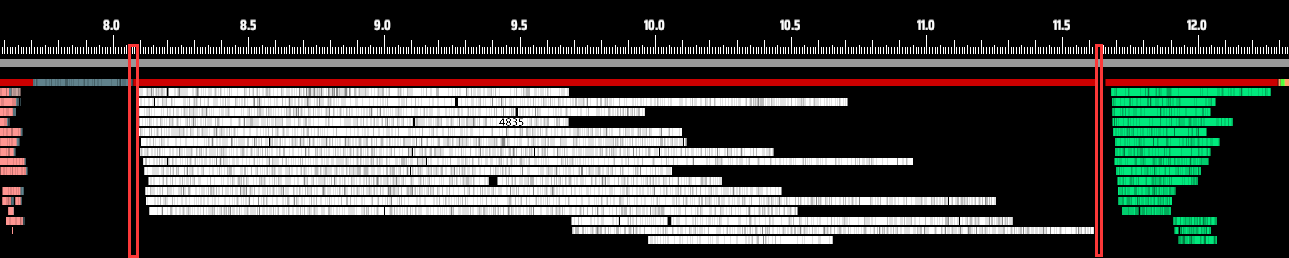
The above is the interface of the Deep Profiler: The horizontal axis represents game runtime. Each row corresponds to a specific thread’s workload per frame. This tool helps players understand the inner workings of their CPU in real time.
The above is excerpted from our earlier devr log on the multithreading system update. For more details, you can check it out here: In the gaming community, you never know what surprises players will bring. During the public test, one player shocked us by running the multithreaded version of DSP on a Threadripper CPU!
Not only was it jaw-dropping, but it also brought us valuable feedback: our game didn't seem to support more than 64 threads. We quickly located and fixed this "happy problem."
But the story doesn't end there! Facing such high-end hardware, we ran into another problem—our team didn't have such a "god-tier" equipment to test on. So, we made a bold decision: shamelessly asking the player if we could "borrow" his CPU power for a round of benchmarking.
From the screenshot, the game didn't show much difference compared to consumer-grade CPUs. After some probing, we found the reason: the player's memory was DDR4-2666. The bottleneck was most likely the memory! So the big question is: how do we optimize further? And what platform should we use to validate those optimizations?
Just as we were at a loss, we reached out to AMD. To our delight, they generously offered us a beast of a machine: a Threadripper PRO 9985WX system!
The specs alone are thrilling: 64 cores, 128 threads; Base clock 3.2 GHz, boost up to 5.4 GHz; Support for up to 8 memory channels. This is the ultimate testing platform tailor-made for us! 😿 Unfortunately, due to typhoon delays, this monster is still on its way to us. Please join us in waiting patiently for the unboxing moment!
Once the "beast" arrives, we'll immediately begin in-depth optimization and testing on this extreme hardware. And if you're a Threadripper owner yourself, stay tuned—the optimizations we're preparing for you are coming soon! (Of course, consumer-grade CPUs will also see performance improvements.)
🌌 Notes and FAQsQ: What should I do if I encounter a bug? A: If you run into bugs, please first make sure your game is in a clean (unmodded) state. We suggest removing all mods and restarting the game before checking again. If the bug still occurs in a clean environment, please report it in the #bug-report channel on our Discord. Our team will review and address the issues as soon as possible.
Q: Can old saves work seamlessly with the new multithreading system? A: Yes. Old saves can be loaded directly in the new version — no need to start a new game. But we still highly recommend backing up your files before updating—just in case. Default save location (if unchanged): %USERPROFILE%\\Documents\\Dyson Sphere Program\\Save\\
Q: Will my existing Mods still work? A: Since this update completely overhauled the core logic of the game, with major code changes, most Mods will conflict with the base game. If you've been using Mods, we strongly recommend backing up your saves and Mods before updating. Also, make sure your game files are unmodified during the update, otherwise unexpected errors may occur.
Q: What kind of performance boost should I expect? How can I feel it? A: The main improvement is in the CPU's "game logic frame" time. As shown in the dev log, there is a noticeable boost in logic frame performance. If your save contains large factories or intense combat, the difference will be more noticeable.
Q: What if the game feels laggier after I adjusted the multithreading settings? A: First, try resetting everything to the default settings (including the ratio between logic frames and render frames). You can also check our setup guide for more options. If you're aiming for even better performance, feel free to join our official Discord server to discuss with other players and admins to find the best configuration for your hardware.
Q: Why does the execution time of logic frames look longer after the update compared to before? A: For saves that were already running very smoothly (logic frame execution time under 5ms), the reported values may appear slightly higher with the new system. But as long as it stays around 5ms, there will be no difference in actual gameplay experience. The real improvement is seen in heavier cases (when logic frames drop below 60 FPS and execution time goes above 8ms). In those situations, the new system delivers a significant boost. |
| 10/09/2025 | Whether you're building a Dyson Sphere that envelops a star or forging a fleet empire that spans the galaxies, the infinite cosmos carries humanity’s ultimate dream. Dyson Sphere Program and X4: Foundations proudly present their new bundle—Cosmic Constructors. Master the journey from micro to macro; from solo builder to stellar empire —everything lies in your hands! Grab the bundle now and enjoy a 10% discount as you embark on your cosmic journey! 🚀 |
| 25/08/2025 | We're thrilled to have partnered with our publishers to bring Dyson Sphere Program to Cologne. Meeting players from around the world and hearing your amazing stories was truly an honor. Now, we'll be taking a short break before diving back into development (though let's be real - the dev work never really stopped! 😉). Here's a look back at our adventure - see you next time!
|
| 22/08/2025 | Dyson Sphere Program and The Riftbreaker join forces in a special bundleSpace factory automation × mech combat base-building. Get two iconic sci-fi experiences in one package — build, explore, and fight your way across the galaxy! Enjoy a 10% discount on the bundle. Already own one of the games? You can grab the other at 10% off too, and complete your interstellar builder’s collection with ease! Suit up your mech and conquer the stars!
|
| 12/08/2025 | 🎊 As our screenshot event comes to a close, we’ve received an incredible collection of works from engineers across the galaxy—some capturing the breathtaking splendor of the stars, others showcasing the intricate might of sprawling industrial empires. Each shot preserves a unique moment of Icarus’ journey through the cosmos. 🙇 A heartfelt thank you to everyone who froze these moments in time through your lens, allowing us to once again feel the romance and power of interstellar exploration. 🎉 After careful review by the development and publishing teams, Winner List is here! Come see if your name is among them!
📣 Winner List (in no particular order):
🎁 Prize DistributionSteam Gift Cards: We will contact you via direct message within 7 business days to distribute your prize. Please keep your direct messages open. ⚠️ If you have any questions about claiming your prize or have not received it, please contact us via email: 👑 Featured Works Showcase
|
| 08/08/2025 | We’ve concluded our Chinajoy exhibition in Shanghai, China! Next, we’re heading to Cologne, Germany for Gamescom (August 20-24 Hall 10.2 E-14). If you’ll be there, don’t miss our booth at Hall 10.2 E-14 ——
Booth Number: Hall 10.2 E-14 P.S. Yes, the lead creators will be on-site. Your chance to chat with the minds behind the cosmos!
|
| 21/07/2025 |
Hello Engineers, The public test for our newly rebuilt multithreading system is now live! This test is open to all players and focuses on evaluating the performance of the new multithreading system under different hardware configurations. We sincerely invite all engineers to participate in this public test—your feedback will help us create a better gameplay experience!
How to join the test?1. Open your Steam Library → Right-click Dyson Sphere Program → Properties → Betas → Select the branch: public-test-0 - Public test branch for new features. 2. During the test, if you encounter any issues, feel free to report them in the #multithreading-bugs channel on our Discord: Why rebuild the multithreading system now?While we’ve been steadily developing the vehicle system and core game features, we realized that the growing complexity of the game was pushing our current architecture to its limits. Without addressing these performance bottlenecks. If the CPU performance bottleneck is not resolved, the addition of the vehicle system could seriously affect the gameplay experience. Out of responsibility to our players, we once again analyzed and reviewed all core systems in the game. We chose to focus this round of performance optimization on the multithreading system and completely rewrote the related code. This will allow us to more effectively utilize multi-core CPU power and alleviate stuttering and frame drops during large-scale factory operations. (See the multithreading dev log for more details: More importantly, this optimization will also lay a more stable and smoother foundation for the future vehicle system update. So whether you’re a min-maxing player optimizing every second of production or a relaxed explorer traveling the stars, we hope this update gives you a smoother experience.
Update Log for Multithreading System: ● Completely overhauled the \. The new multithreading system can more efficiently unleash performance potential, bringing more frame rate improvements in large-scale factories. ● \: Added advanced settings for the new multithreading system. The advanced settings include \, \, \, and \ — 4 customizable strategies. By customizing these strategies, players can better utilize the new multi-threading system. ● Overhauled the \ performance test. The new performance test is compatible with the overhauled game core logic, helping players better analyze game performance overhead. ● Added \. This tool can be accessed by clicking the \ button in the Performance Test (CPU). It provides real-time operational data for all game logic, allowing players to directly observe the execution methods and efficiency of the game's core logic. ● \ logic now uses Dynamic Allocation Strategy in multithreading, improving CPU core utilization. ● \ updates in worker threads synchronize with \ in the main thread, improving CPU core utilization and operational efficiency. ● \ logic added to multithreading with Dynamic Allocation Strategy, improving CPU core utilization and operational efficiency. ● \ logic uses Dynamic Allocation Strategy in multithreading, improving CPU core utilization. ● \, \, and \ logic adopt Dynamic Allocation Strategy in multithreading, improving CPU core utilization. ● \ logic updates in worker threads synchronize with \, \, and \ in the main thread, improving operational efficiency. ● \, \, \, \, and \ logic added to multithreading with Dynamic Allocation Strategy, improving CPU core utilization and operational efficiency. ● Core logic of \ added to multithreading with Dynamic Allocation Strategy. Updates synchronize with related positional logic of \ and \ in the main thread, improving CPU core utilization and operational efficiency. ● \ use Dynamic Allocation Strategy in multithreading and synchronize with \ in the main thread, improving CPU core utilization and operational efficiency. ● \ added to multithreading and synchronized with \ in the main thread, improving CPU core utilization and operational efficiency.
Notes and FAQs1. About Save Files & Mods Q: Can I use my old save files in the test branch? A: Yes, old save files are compatible with the test branch. However, we strongly recommend backing up your saves locally beforehand to prevent any potential data corruption.
Q: Will saves from the test branch be compatible with future official versions or the default branch? A: In principle, yes. Save files from the test branch should be compatible with both future official releases and the default branch. That said, we still highly recommend backing up your files before switching branches—just in case. Default save location (if unchanged): %USERPROFILE%\\Documents\\Dyson Sphere Program\\Save\\
Q: Can I still use my old Mods in this test version? A: We advise against using any mods during this test phase. This update includes a complete overhaul of the game’s core logic, with major code changes that may cause conflicts with most existing mods. If you’ve previously used mods, please back up your saves and mod files before switching branches, and ensure your game files are clean to avoid unexpected errors. Of course, we deeply value and support the modding community and are always inspired by your creativity. One of the goals of this test is also to give modders enough time to adapt their mods for the new system.
Q: Will logic circuits built with splitters still work? A: If your logic circuits are built using vanilla splitter and traffic monitor setups, they should still work. However, setups that rely on modifications or unconventional configurations may no longer behave as expected.
2. Multithreading Settings & Performance Q: Where can I monitor thread performance? A: We’ve added a new \ tool. You can access it from the Performance Test (CPU) panel by clicking the \ button. This tool shows real-time data for all logic threads and helps you better understand how the core systems are running.
Q: How do I configure CPU core binding? What if I don’t understand hardware? A: We add The Advanced Multithreading Settings in \ allows you to customize strategies like thread binding and scheduling. If you’re not familiar with hardware, just use the \ to test different presets and see what works best for you. We’ve also provided a default strategy that should work well for most setups. You can always discuss tuning strategies in our community groups.
Q: What kind of performance boost should I expect? How can I feel it? A: The main improvement is in the CPU's "game logic frame" time. As shown in the dev log, there is a noticeable boost in logic frame performance. If your save contains large factories or intense combat, the difference will be more noticeable.
Q: My CPU uses a hybrid architecture (e.g. P-cores/E-cores). Will this update help? A: Our system supports hybrid architecture. If you're using Windows 11, performance will generally be better than on Windows 10.
Q: Does this optimization reduce the hardware requirements? A: This update mainly improves how efficiently CPU threads are used—it doesn't lower the hardware requirement overall. There is still significant GPU load in DSP.
3. Other Questions Q: What are the future update plans? How’s the vehicle system coming along? A: We’ve planned our 2025 development roadmap, and the vehicle system is progressing steadily. We'll share more updates when ready.
Q: What should I do if I encounter bugs during the test? A: If you run into bugs, please first make sure your game is in a clean (unmodded) state. We suggest removing all mods and restarting the game before checking again. If the bug still occurs in a clean environment, please report it in the #multithreading-bugs channel on our Discord. Our team will review and address the issues as soon as possible.
Final WordsThanks again to all our engineers for your patience and support! We truly hope you’ll take part in this public test and help us fine-tune the new multithreading system. And of course—we’re extremely excited to see just how far the power players among you can push the game’s limits with this massive optimization boost! Let’s build a better Dyson Sphere Program together! Discord: Other updates in this version (excluding multithreading):V0.10.33.26465
\ ● Remade \ display mode. It provides 3 options: Borderless(cursor freed / confined), Exclusive Fullscreen, Windowed. The maximum resolution for Windowed mode is the maximized window size excluding window borders and taskbar space. ● Now shadow casting can be set in \. Turning it off can slightly reduce rendering overhead. ● Now the maximum duration of ground Dark Fog debris can be set in \. ● \ Production: Added sorting by ascending / descending consumption rate. ● \ Upgrade Facilities: Added upgrade/downgrade by 3 levels functionality. ● \: Added \ button. When pasting a blueprint code, information related to the blueprint such as description will remain unchanged.
\ ● \ Power: Facilities not connected to a power grid will no longer be recorded in power demand. ● When opening the \, it now defaults to the latest browsed folder from current session. ● \ Recipe tip now only displays the formula for that recipe, and no longer shows all formulas for this item. ● Optimized the pop-up position of \ tooltips to ensure that the content is not obscured by other UI elements. ● Adjusted the box colliders of miniature particle collider. After dragging to build, it allows a Tesla Tower to be built between two miniature particle colliders. ● The maximum level of \ has been modified to 88. ● Click the in-game clock in the bottom-right menu to toggle between 12-hour clock and 24-hour clock.
\ ● Fixed an issue where opening the Dyson Sphere Panel (Y) while the Dashboard was active could cause incorrect background colors on side UI elements. ● Fixed mouse wheel zoom responsiveness in the Dyson Sphere Panel (Y) when accelerating logic frame rates in outer space. ● Fixed incorrect display of the 3×1 layout of \ for conveyor belts and logistics stations in the Dashboard. ● Fixed a bug where the number of \ for storage tanks is incorrect after selected monitoring current and overhead facilities. ● Fixed a bug where destroying space units such as Relay Stations and Lancers may leave black shadows at the original location. ● Fixed a bug where disabling the construction function of mecha construction drones might cause an error. ● Fixed an issue on the \ where pressing \ after clicking “Load” would exit the entire panel instead of just closing the dialog. ● Fixed a bug where "Matrix" text fails to highlight when the mouse quickly moves across different matrices in the \. ● Fixed a bug where some plants are missing icons in \. ● Fixed a bug where abnormal detection could be incorrectly triggered upon reaching extremely high mineral utilization levels. ● Fixed several UI layering issues. ● Corrected various localization text.
|
| 18/07/2025 | On July 20, 1969, humanity set foot on the Moon for the first time, opening a new chapter in space exploration. When Icarus leaves its initial planet and soars among the stars, with the galaxy unfolding in breathtaking detail across the screen, a new chapter of Dyson Sphere Program begins as well. Decades later, we still remember that historic first step on the Moon—and we will also remember every moment Icarus lit up the stars and strove to build a Type III civilization.Now, it's time to capture your own mark on the cosmos. Snap the shutter, and share your journey across the stars.
About Screenshot Mode“Screenshot Mode” is a new feature added to Dyson Sphere Program this year. Press \ to enter the mode, where you can adjust various parameters and camera angles to help capture your most awe-inspiring moments.
Contest Timeline
Rules
How to SubmitChoose any one of the following methods:
Judging Criteria
Prizes
Notes
|
| 15/07/2025 | Greetings, Engineers! We are proud to announce a special milestone for Dyson Sphere Program — we are hosting our very first fan concert this summer. This is uncharted territory for both our development and publishing teams, as we have never organized an event like this before. The idea was born rather unexpectedly on a winter afternoon: “What should we do this year?” “What if we held a concert?” “Let’s make it happen.” And so, an ordinary day turned into the beginning of something entirely new. To all our engineers who have supported us over the years — thank you. Your continued enthusiasm and love have brought us this far. We are committed to going even further, to creating more meaningful, joyful experiences that resonate not only across the stars and galaxies, but also in our shared imagination and memories. We sincerely hope this new endeavor will be a smooth and successful one. The Dyson Sphere Program symphony concert “Cosmic Harmony of Light and Strings” will take place on August 1st at the Jaguar Shanghai Symphony Hall. We warmly invite you to join us in person as we celebrate this journey together through music. And before we forget — here’s how to get your tickets! Ticket Information: Tickets are available via the Shanghai Symphony Orchestra official website. (Special thanks to Republic of Gamers for their generous sponsorship.)
|
| 27/06/2025 | Hello, Engineers! We're excited to share that development of Dyson Sphere Program has been progressing steadily over the past few months. Every line of code and every new idea reflects our team's hard work and dedication. We hope this brings even more surprises and improvements to your gameplay experience!
(Vehicle System: Activated!)
Bad News: CPU is maxing out
During development and ongoing maintenance, we've increasingly recognized our performance ceilings. Implementing vehicle systems would introduce thousands of physics-enabled components—something the current architecture simply can't sustain.
Back in pre-blueprint days, we assumed "1k Universe Matrix/minute" factories would push hardware limits. Yet your creativity shattered expectations—for some, 10k Universe Matrix was just the entry-level challenge. Though we quickly rolled out a multithreading system and spent years optimizing, players kept pushing their PCs to the absolute limit. With pioneers achieving 100k and even 1M Universe Matrix! Clearly, it was time for a serious performance boost. After a thorough review of the existing code structure, we found that the multithreading system still had massive optimization potential. So, our recent focus has been on a complete overhaul of Dyson Sphere Program's multithreading framework—paving the way for the vehicle system's future development.
Multithreading in DSP
Let's briefly cover some multithreading basics, why DSP uses it, and why we're rebuilding the system.
Take the production cycle of an Assembler as an example. Ignoring logistics, its logic can be broken into three phases: 1. Power Demand Calculation: The Assembler's power needs vary based on whether it's lacking materials, blocked by output, or mid-production. 2. Grid Load Analysis: The power system sums all power supply capabilities from generators and compares it to total consumption, then determines the grid's power supply ratio. 3. Production Progress: Based on the Power grid load and factors like resource availability and Proliferator coating, the production increment for that frame is calculated.
Individually, these calculations are trivial—each Assembler might only take a few hundred to a few thousand nanoseconds. But scale this up to tens or hundreds of thousands of Assemblers in late-game saves, and suddenly the processor could be stuck processing them sequentially for milliseconds, tanking your frame rate.
Luckily, most modern CPUs have multiple cores, allowing them to perform calculations in parallel. If your CPU has eight cores and you split the workload evenly, each core does less, reducing the overall time needed.
But here's the catch: not every Assembler takes the same time to process. Differences in core performance, background tasks, and OS scheduling mean threads rarely finish together—you're always waiting on the slowest one. So, even with 8 cores, you won't get an 8x speedup.
So, next stop: wizard mode.
Okay, jokes aside. Let's get real about multithreading's challenges. When multiple CPU cores work in parallel, you inevitably run into issues like memory constraints, shared data access, false sharing, and context switching. For instance, when multiple threads need to read or modify the same data, a communication mechanism must be introduced to ensure data integrity. This mechanism not only adds overhead but also forces one thread to wait for another to finish.
There are also timing dependencies to deal with. Let's go back to the three-stage Assembler example. Before Stage 2 (grid load calculation) can run, all Assemblers must have completed Stage 1 (power demand update)—otherwise, the grid could be working with outdated data from the previous frame.
To address this, DSP's multithreading system breaks each game frame's logic into multiple stages, separating out the heavy workloads. We then identify which stages are order-independent. For example, when Assemblers calculate their own power demand for the current frame, the result doesn't depend on the power demand of other buildings. That means we can safely run these calculations in parallel across multiple threads.
What Went Wrong with the Old System
Our old multithreading system was, frankly, showing its age. Its execution efficiency was mediocre at best, and its design made it difficult to schedule a variety of multithreaded tasks. Every multithreaded stage came with a heavy synchronization cost. As the game evolved and added more complex content, the logic workload per frame steadily increased. Converting any single logic block to multithreaded processing often brought marginal performance gains—and greatly increased code maintenance difficulty.
To better understand which parts of the logic were eating up CPU time—and exactly where the old system was falling short—we built a custom performance profiler. Below is an example taken from the old framework:
(Thread performance breakdown in the old system) In this chart, each row represents a thread, and the X-axis shows time. Different logic tasks or entities are represented in different colors. The white bars show the runtime of each sorter logic block in its assigned thread. The red bar above them represents the total time spent on sorter tasks in that frame—around 3.6 ms. Meanwhile, the entire logic frame took about 22 ms.
(The red box marks the total time from sorter start to sorter completion.) Zooming in, we can spot some clear issues. Most noticeably, threads don't start or end their work at the same time. It's a staggered, uncoordinated execution.
(Here, threads 1, 2, and 5 finish first—only then do threads 3, 4, and 6 begin their work)
There are many possible reasons for this behavior. Sometimes, the system needs to run other programs, and some of those processes might be high-priority, consuming CPU resources and preventing the game's logic from fully utilizing all available cores.
Or it could be that a particular thread is running a long, time-consuming segment of logic. In such cases, the operating system might detect a low number of active threads and, seeing that some cores are idle, choose to shut down a few for power-saving reasons—further reducing multithreading efficiency.
In short, OS-level automatic scheduling of threads and cores is a black box, and often it results in available cores going unused. The issue isn't as simple as "16 cores being used as 15, so performance drops by 1/16." In reality, if even one thread falls behind due to reasons like those above, every other thread has to wait for it to finish, dragging down the overall performance.Take the chart below, for example. The actual CPU task execution time (shown in white) may account for less than two-thirds of the total available processing window.
(The yellow areas highlight significant zones of CPU underutilization.) Even when scheduling isn't the issue, we can clearly see from the chart that different threads take vastly different amounts of time to complete the same type of task. In fact, even if none of the threads started late, the fastest thread might still finish in half the time of the slowest one.
Now look at the transition between processing stages. There's a visible gap between the end of one stage and the start of the next. This happens because the system simply uses blocking locks to coordinate stage transitions. These locks can introduce as much as 50 microseconds of overhead, which is quite significant at this level of performance optimization.
The New Multithreading System Has Arrived!
To maximize CPU utilization, we scrapped the old framework and built a new multithreading system and logic pipeline from scratch.
In the brand new Multithreading System, every core is pushed to its full potential. Here's a performance snapshot from the new system as of the time of writing:
The white sorter bars are now tightly packed. Start and end times are nearly identical—beautiful! Time cost dropped to ~2.4 ms (this is the same save). Total logic time fell from 22 ms to 11.7 ms—an 88% improvement(Logical frame efficiency only). That's better than upgrading from a 14400F to a 14900K CPU! Here's a breakdown of why performance improved so dramatically:
1. Custom Core Binding: In the old multithreading framework, threads weren't bound to specific CPU cores. The OS automatically assigned cores through opaque scheduling mechanisms, often leading to inefficient core utilization. Now players can manually bind threads to specific cores, preventing these "unexpected operations" by the system scheduler.
(Zoomed-in comparison shows new framework <right> no longer has threads queuing while cores sit idle like old version <left> )
2. Dynamic Task Allocation: Even with core binding, uneven task distribution or core performance differences could still cause bottlenecks. Some cores might be handling other processes, delaying thread starts. To address this, we introduced dynamic task allocation. Here's how it works: Tasks are initially distributed evenly. Then, any thread that finishes early will "steal" half of the remaining workload from the busiest thread. This loop continues until no thread's workload exceeds a defined threshold. This minimizes reallocation overhead while preventing "one core struggling while seven watch" scenarios. As shown below, even when a thread starts late, all threads now finish nearly simultaneously.
(Despite occasional delayed starts, all threads now complete computations together)
3. More Flexible Framework Design: Instead of the old "one-task-per-phase" design, we now categorize all logic into task types and freely combine them within a phase. This allows a single core to work on multiple types of logic simultaneously during the same stage. The yellow highlighted section below shows Traffic Monitors, Spray Coaters, and Logistics Station outputs running in parallel:
(Parallel execution of Traffic Monitor/Spray Coater/Logistics Station cargo output logic now takes <0.1 ms)
(Previously single-threaded, this logic consumed ~0.6 ms)
Thanks to this flexibility, even logic that used to be stuck in the main thread can now be interleaved. For example, the blue section (red arrow) shows Matrix Lab (Research) logic - while still on the main thread, it now runs concurrently with Assemblers and other facilities, fully utilizing CPU cores without conflicts.
(More flexible than waiting for other tasks to complete)
The diagram above also demonstrates that mixing dynamically and statically allocated tasks enables all threads to finish together. We strategically place dynamically allocatable tasks after static ones to fill CPU idle time.
(Updating enemy turrets/Dark Fog units alongside power grids utilizes previously idle CPU cycles)
4. Enhanced Thread Synchronization: The old system required 0.02-0.03 ms for the main thread to react between phases, plus additional startup time for new phases. As shown, sorter-to-conveyor phase transitions took ~0.065 ms. The new system reduces this to 6.5 μs - 10x faster.
(New framework's wait times <left> are dramatically faster than old <right> )
We implemented faster spinlocks (~10 ns) with hybrid spin-block modes: spinlocks for ultra-fast operations, and blocking locks for CPU-intensive tasks. This balanced approach effectively eliminates the visible "gaps" between phases. As the snapshot shows, the final transition now appears seamless.
Of course, the new multithreading system still has room for improvement. Our current thread assignment strategy will continue to evolve through testing, in order to better adapt to different CPU configurations. Additionally, many parts of the game logic are still waiting to be moved into the new multithreaded framework. To help us move forward, we'll be launching a public testing branch soon. In this version, we're providing a variety of customizable options for players to manually configure thread allocation and synchronization strategies. This will allow us to collect valuable data on how the system performs across a wide range of real-world hardware and software environments—crucial feedback that will guide future optimizations.
(Advanced multithreading configuration interface)
Since we've completely rebuilt the game's core logic pipeline, many different types of tasks can now run in parallel—for example, updating the power grid and executing Logistics Station cargo output can now happen simultaneously. Because of this architectural overhaul, the CPU performance data shown in the old in-game stats panel is no longer accurate or meaningful. Before we roll out the updated multithreading system officially, we need to fully revamp this part of the game as well. We're also working on an entirely new performance analysis tool, which will allow players to clearly visualize how the new logic pipeline functions and performs in real time.
(We know you will love those cool-looking charts—don't worry, we'll be bringing them to you right away!)
That wraps up today's devlog. Thanks so much for reading! We're aiming to open the public test branch in the next few weeks, and all current players will be able to join directly. We hope you'll give it a try and help us validate the new system's performance and stability under different hardware conditions. Your participation will play a crucial role in preparing the multithreading system for a smooth and successful official release. See you then, and thanks again for being part of this journey!
Ends |
| 31/03/2025 | Engineers, hope you're all doing well! Our in-house GameJam has now passed the halfway mark. Since the last update, we've received a wealth of valuable feedback and have been working on bug fixes and optimizations alongside the GameJam. Don’t forget to grab the latest update when you get a chance! Here is today's full update log:
PS:
|
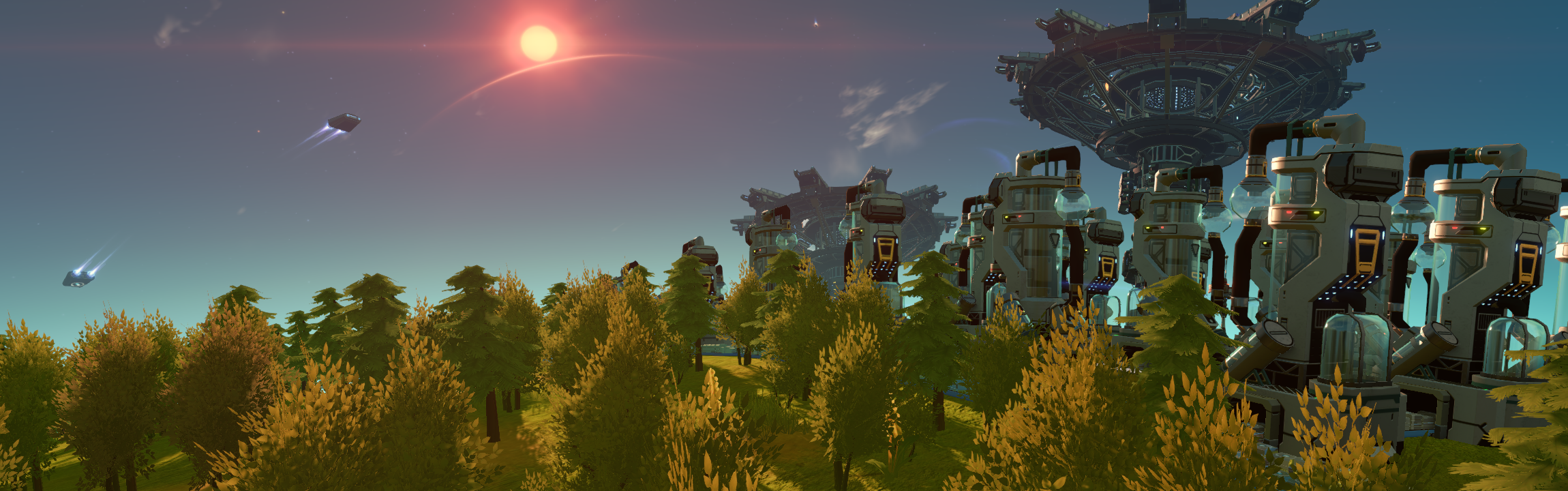
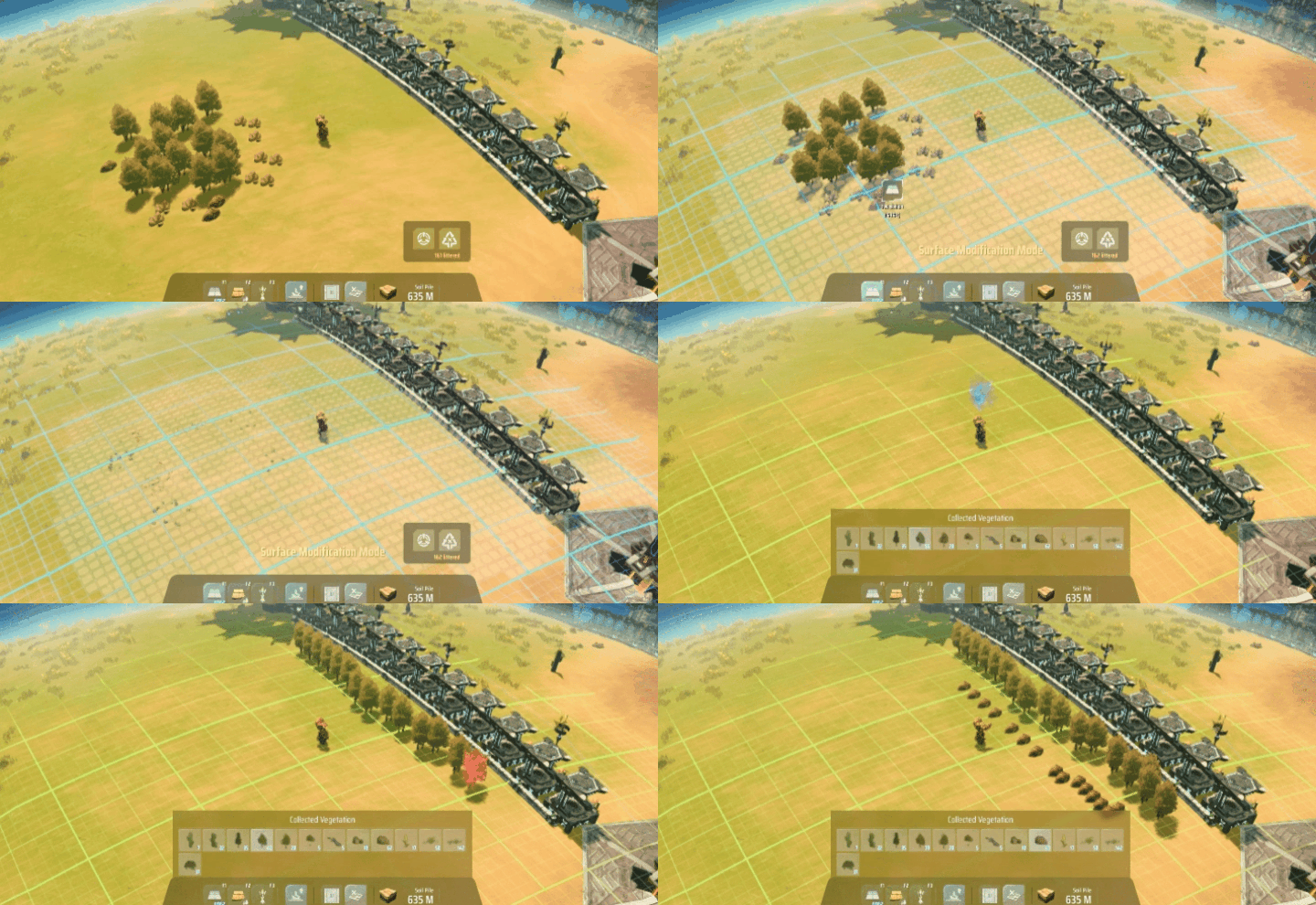
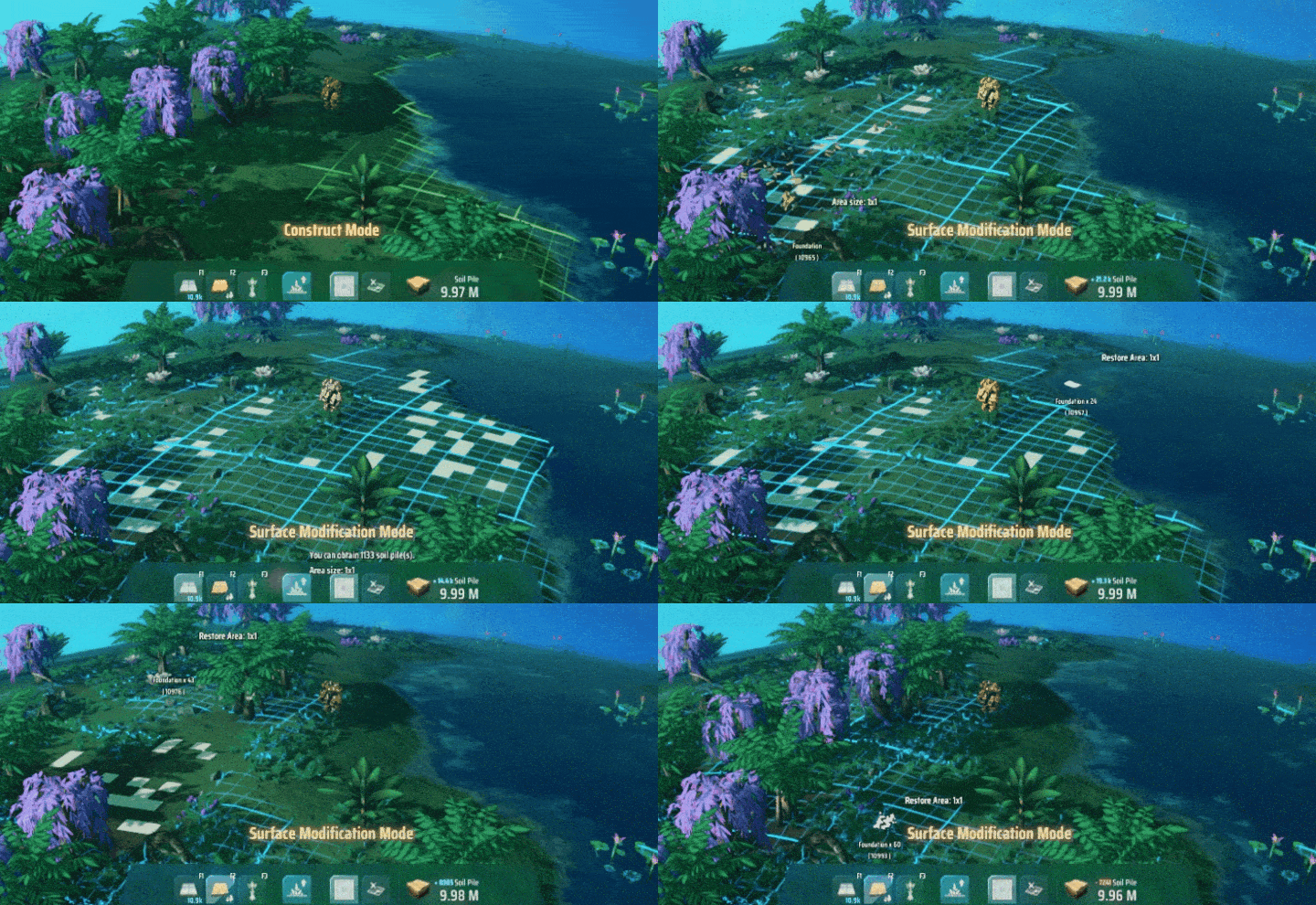



 (However, things have currently... flipped.)
 (Installing components)


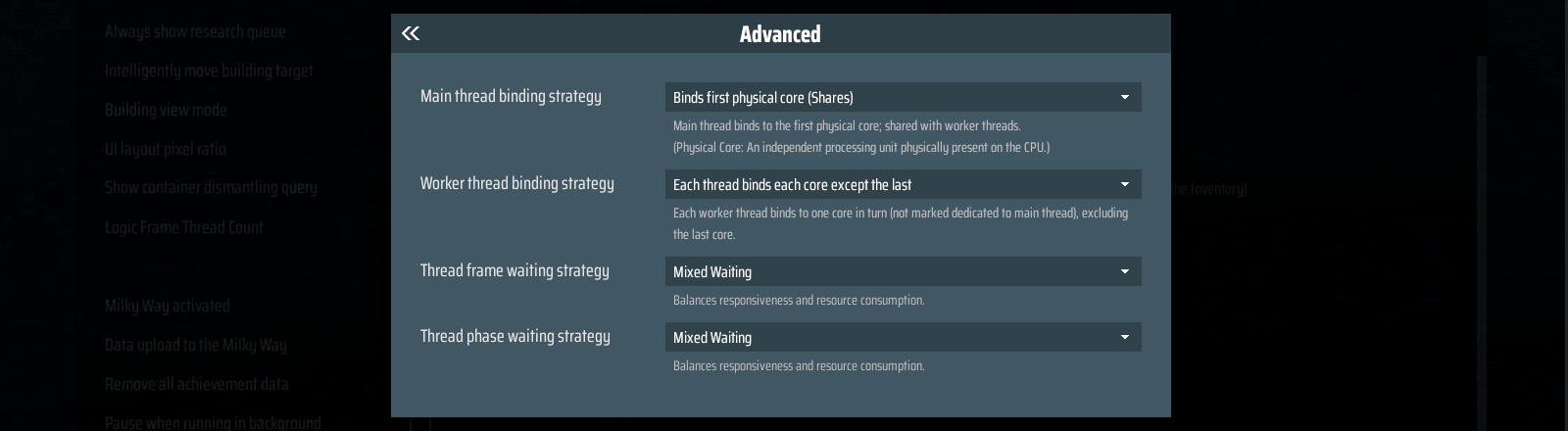


 (Performance on a 680W Universe Matrix Save)


 Discord_ adinkoo00
 Discord_ Phaelex
 Discord_Alabar3000
 Discord_Alan
 Discord_Alvis
 Discord_Bombface68
 Discord_Cementiet
 Discord_Charmich0802
 Discord_Cheeto the destroyer of worlds
 Discord_Crimson Periastron
 Discord_Dansekat2005
 Discord_Dark
 Discord_del
 Discord_Drake
 Discord_Egg.io
 Discord_Fail
 Discord_Feiwuzei
 Discord_Festus
 Discord_Galagtic Grindmaster_1
 Discord_Galagtic Grindmaster_2
 Discord_Geodefence
 Discord_glee8e
 Discord_helking
 Discord_Hioxel
 Discord_horstdaspferd-Ringo
 Discord_IamTheStoner
 Discord_J0!7
 Discord_jd121
 Discord_Khasar
 Discord_MrToasty
 Discord_Myloxl
 Discord_Nova_01
 Discord_Nova_02
 Discord_Ollama Evolution
 Discord_Pedulatsch
 Discord_Preston
 Discord_pt4m
 Discord_Richard76
 Discord_Tealord
 Discord_Thagusta_01
 Discord_Thagusta_02
 Discord_Xac137
 Reddit_ Vladimir_Dj
 Reddit_Chrisical
 Reddit_moke81988
 Reddit_Rayan18
 Reddit_Refute1650
 Reddit_RePsychological
 Reddit_Rezy
 Reddit_Valariuel
 Reddit_zensstrive
 X_Dharmesh
 X_ラッセル


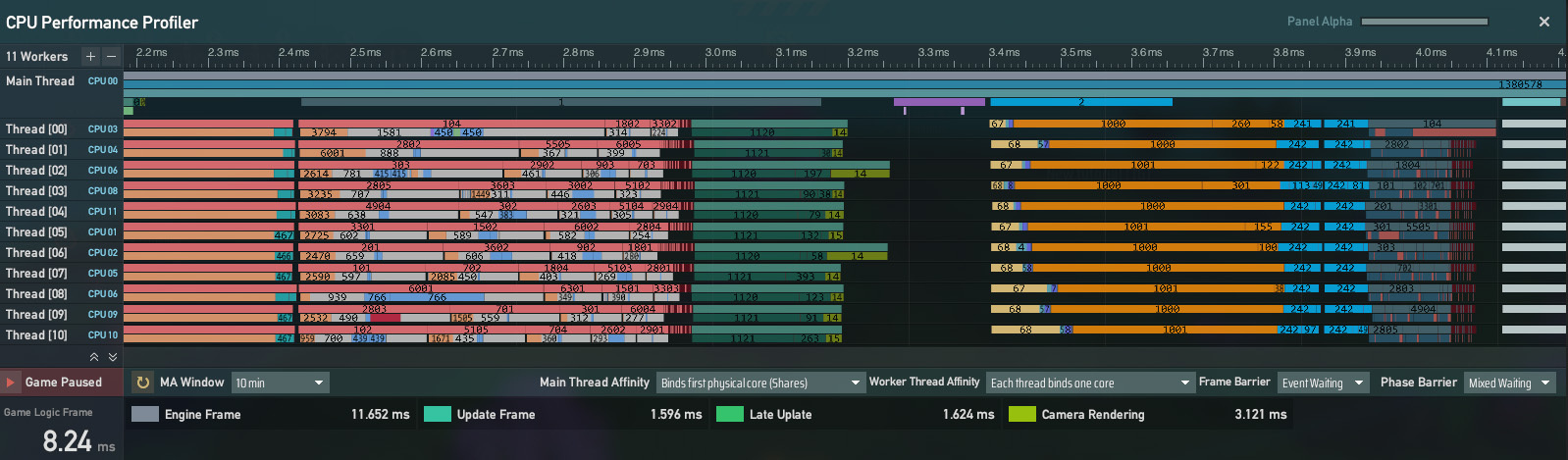
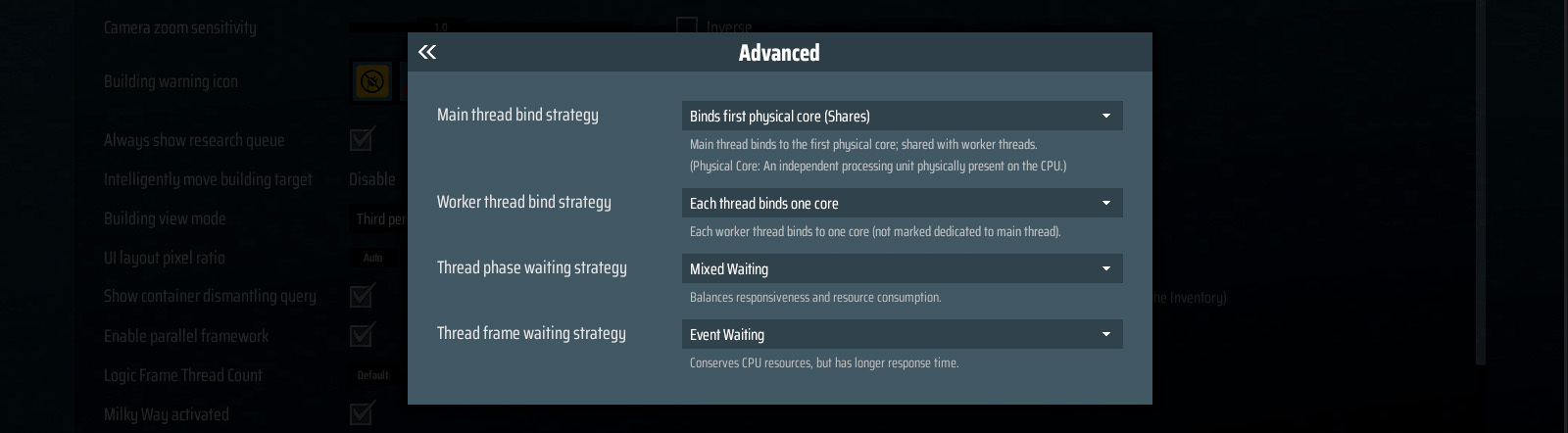


 (A performance snapshot from a 100 K Matrix save. Logic frame time for the entire production line hits 80 ms.)
 (This sea of Assemblers runs smoothly thanks to relentless optimization.)